AI Agent 自我進化,打造紙雕風格建築名片!
整理版優先睇
作者分享經過多次演變嘅紙雕風格建築名片AI提示模板,適用於GPT Image-2、Banana、Ideogram 4等多個模型,並提供完整JSON結構。
作者喺Codex搭建工作流時,發現AI生成嘅風格經常有驚喜,呢套紙雕風格就係Agent多次演變嘅結果——從GPTs到Skill,將「會傾偈嘅助手」變成「能幹活嘅流程」。佢喺唔同模型上都有穩定表現,包括GPT Image-2、Google Banana系列同Ideogram 4。
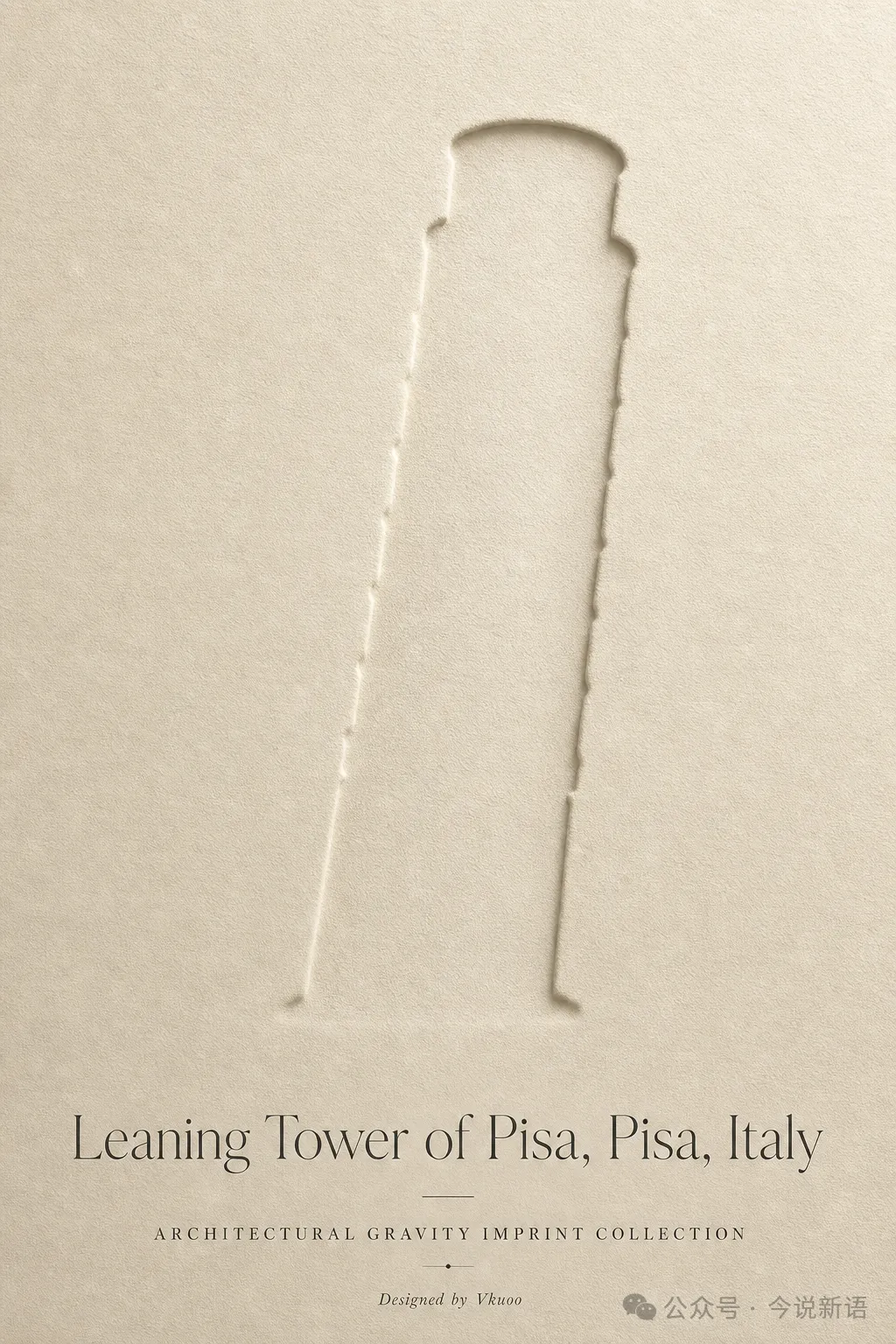
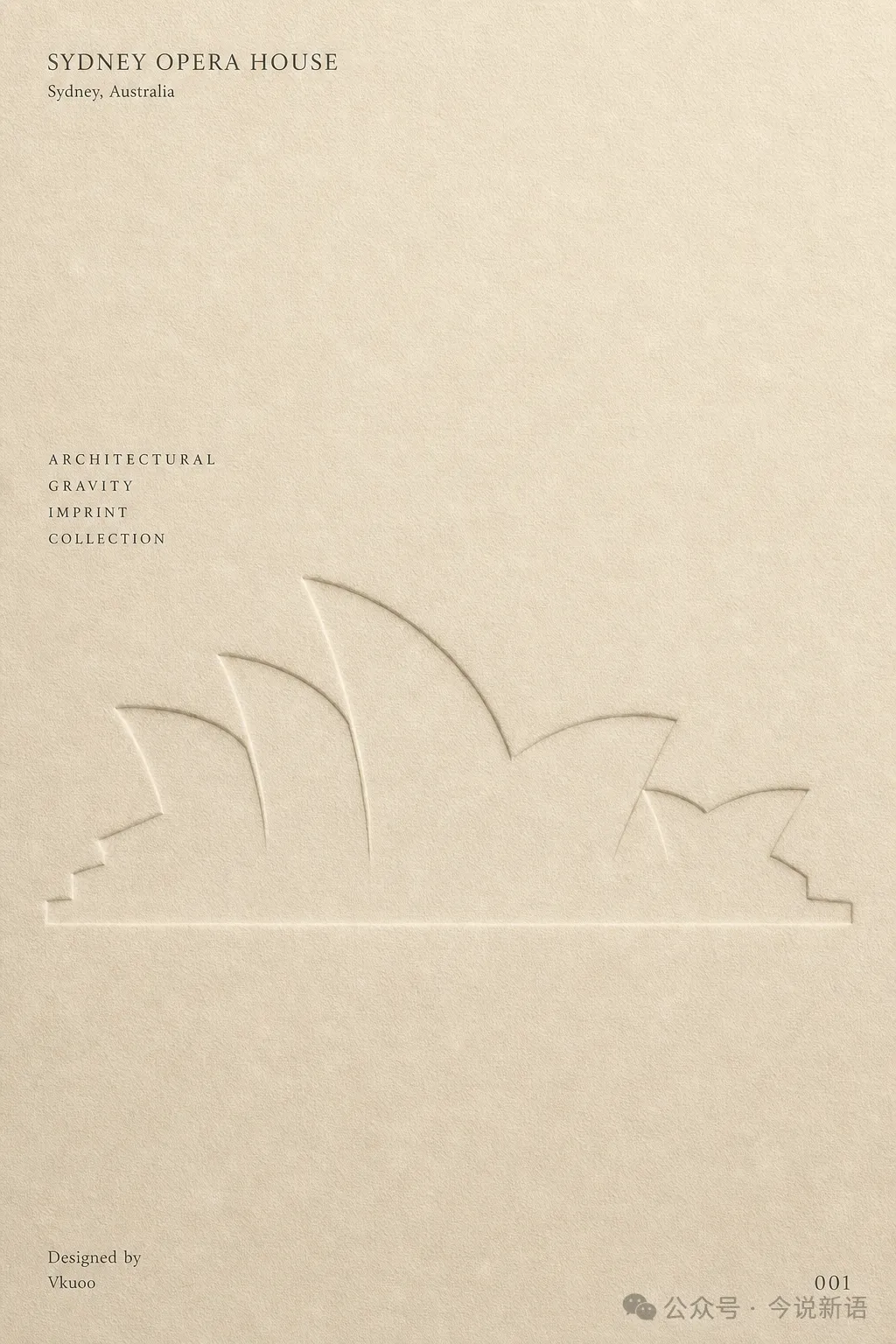
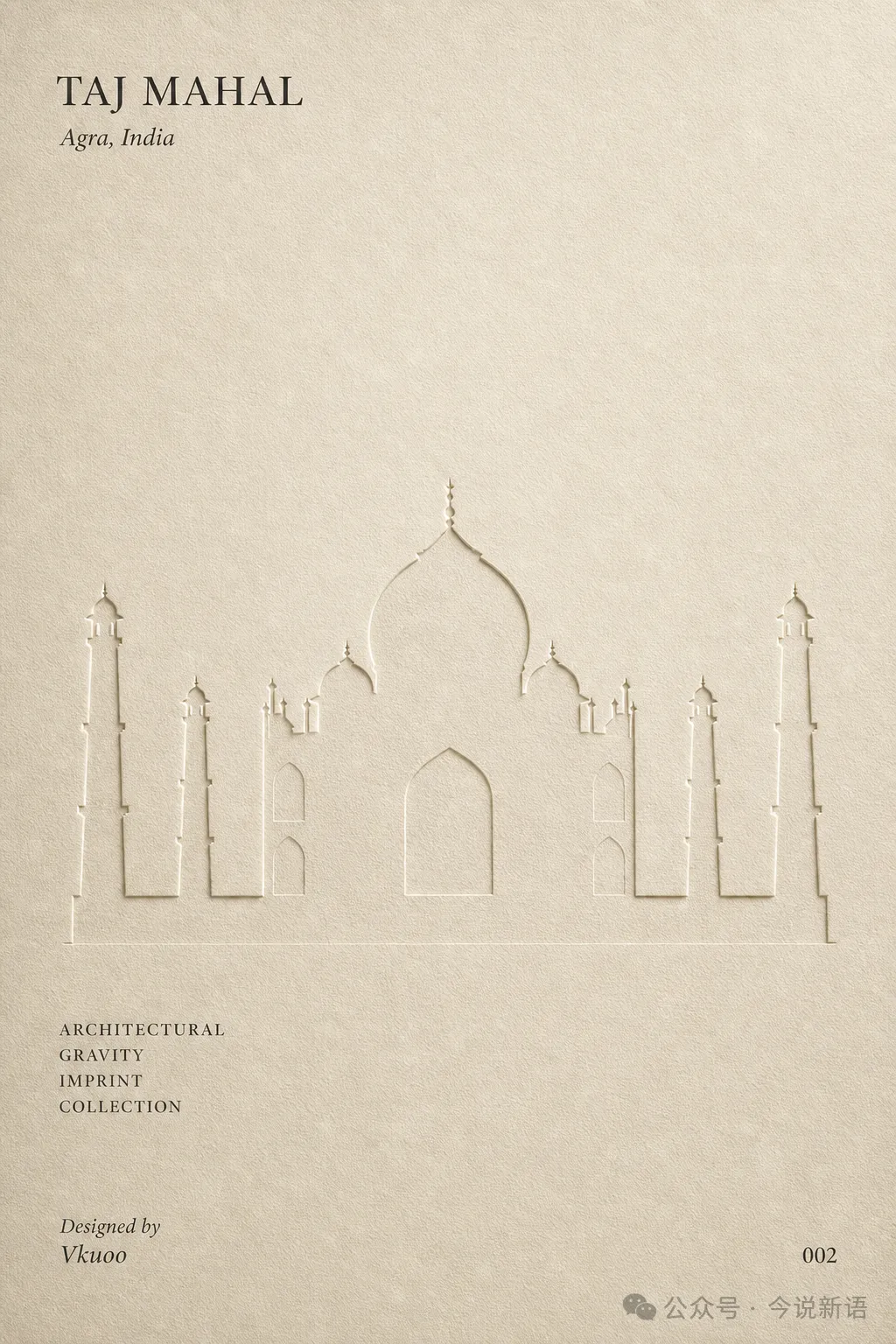
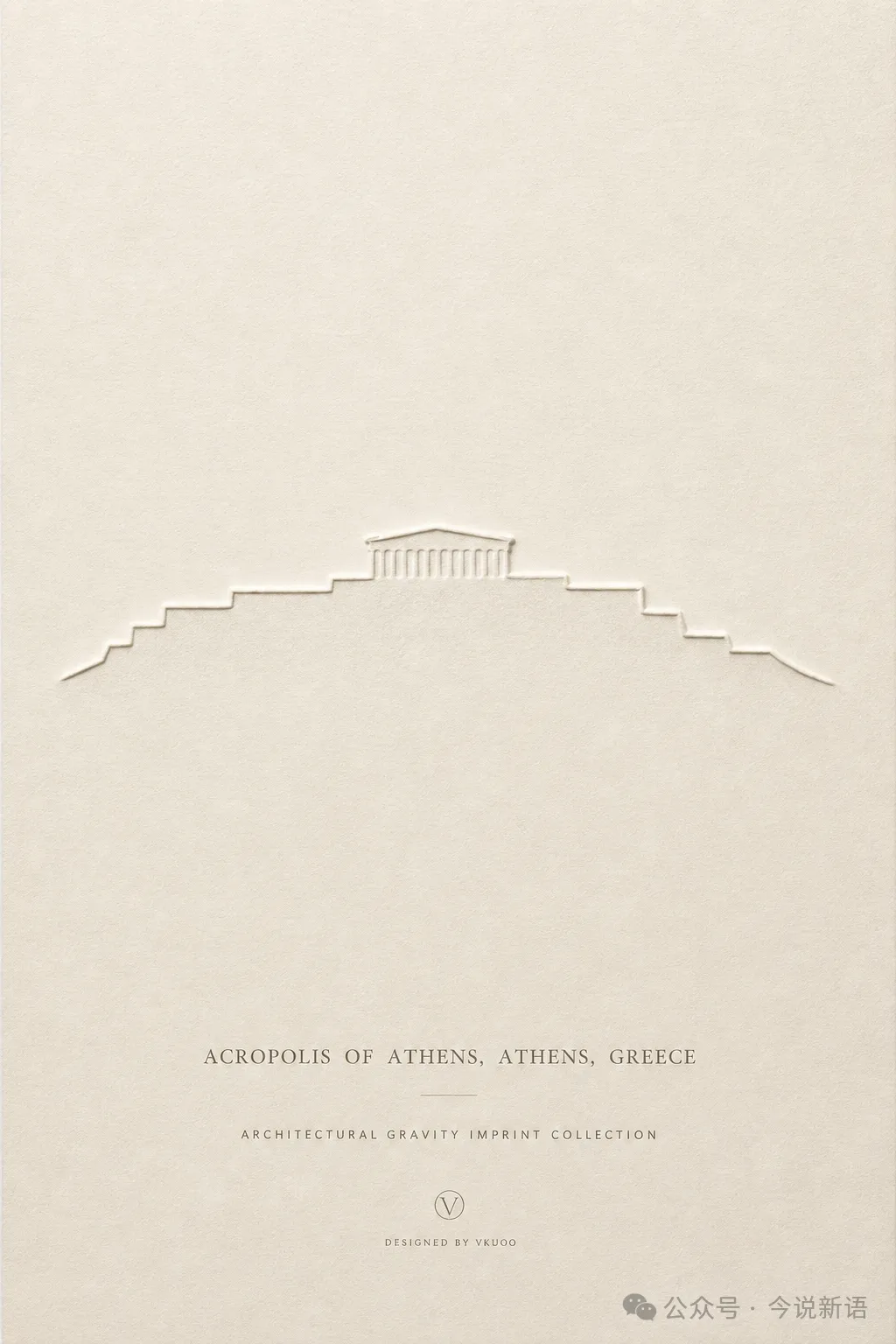
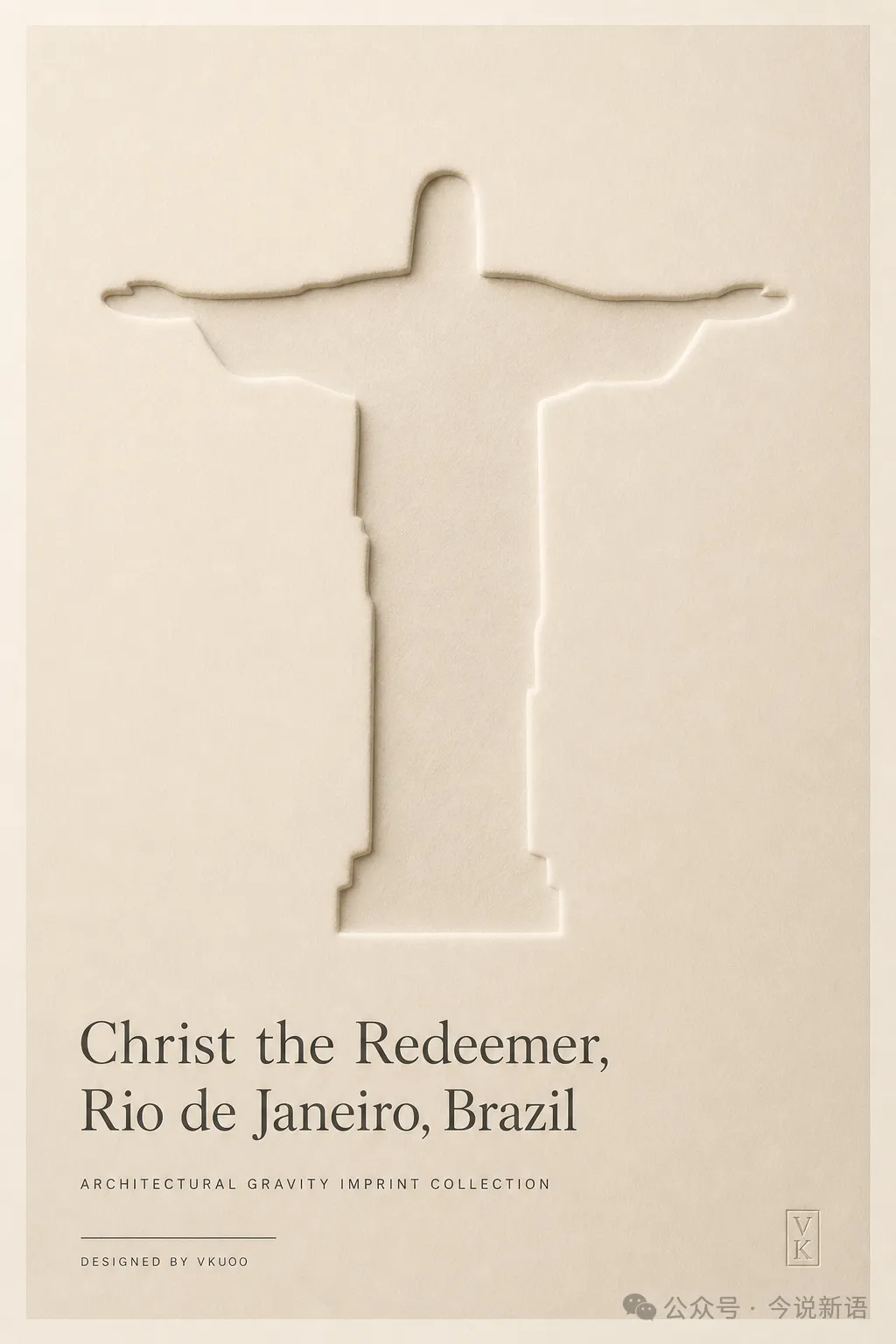
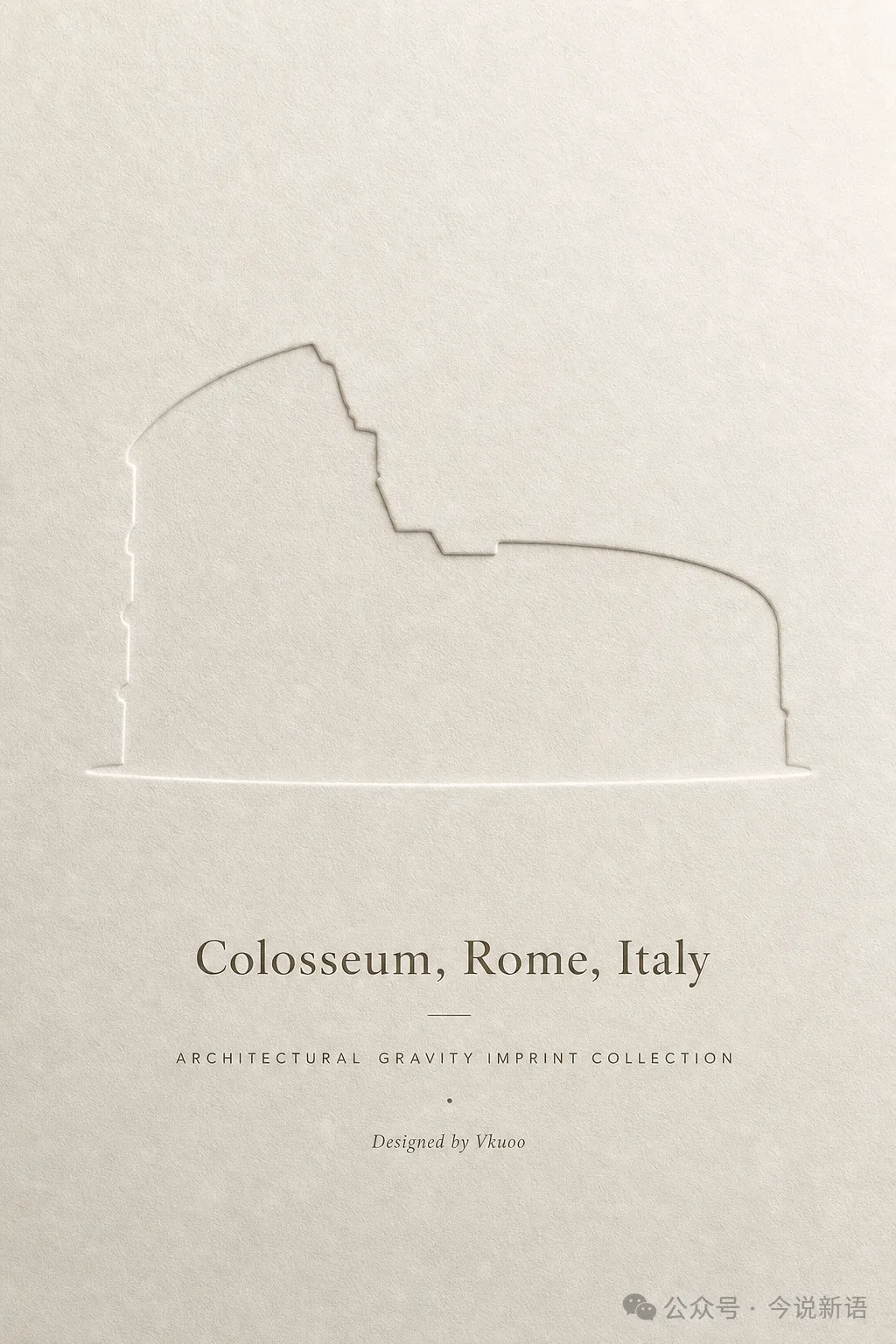
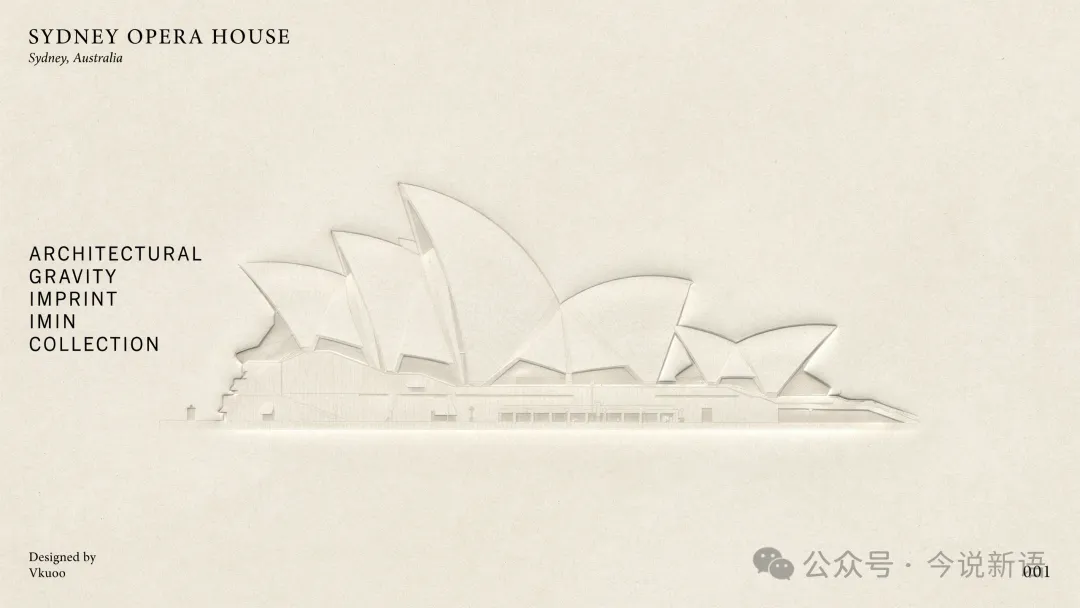
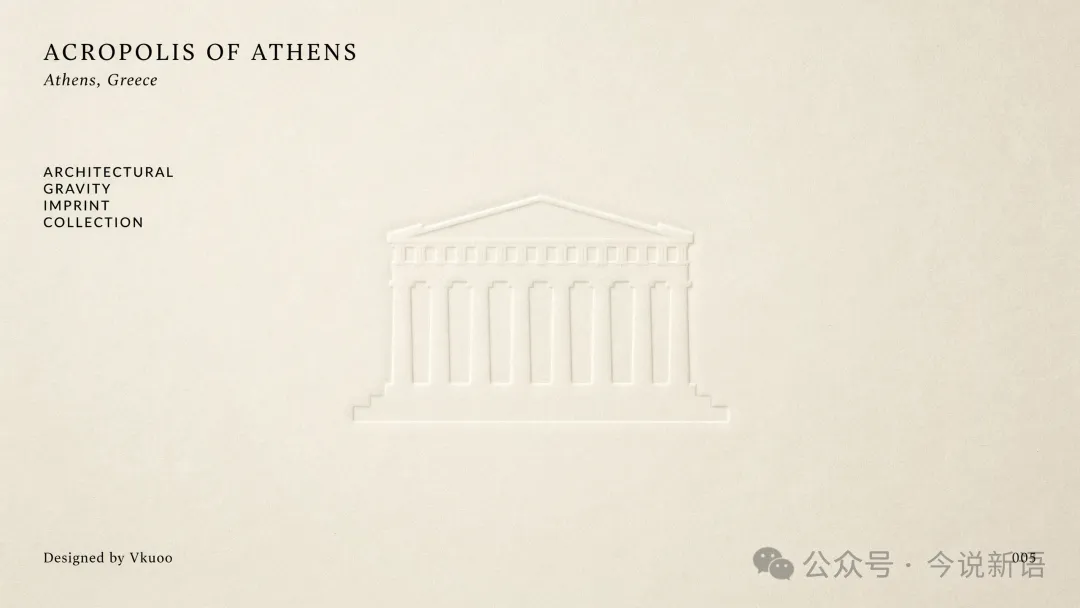
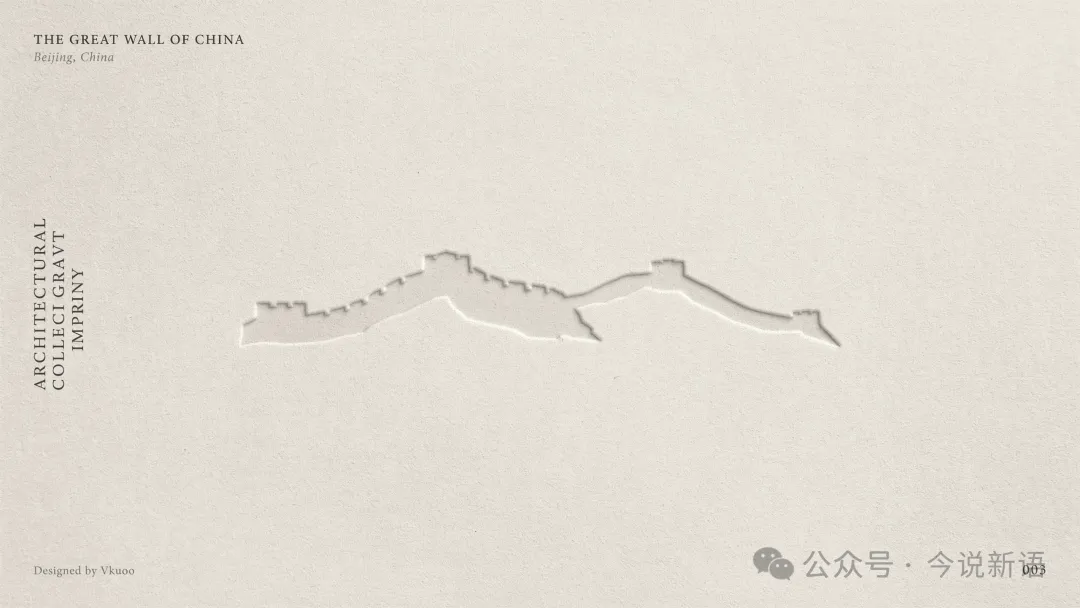
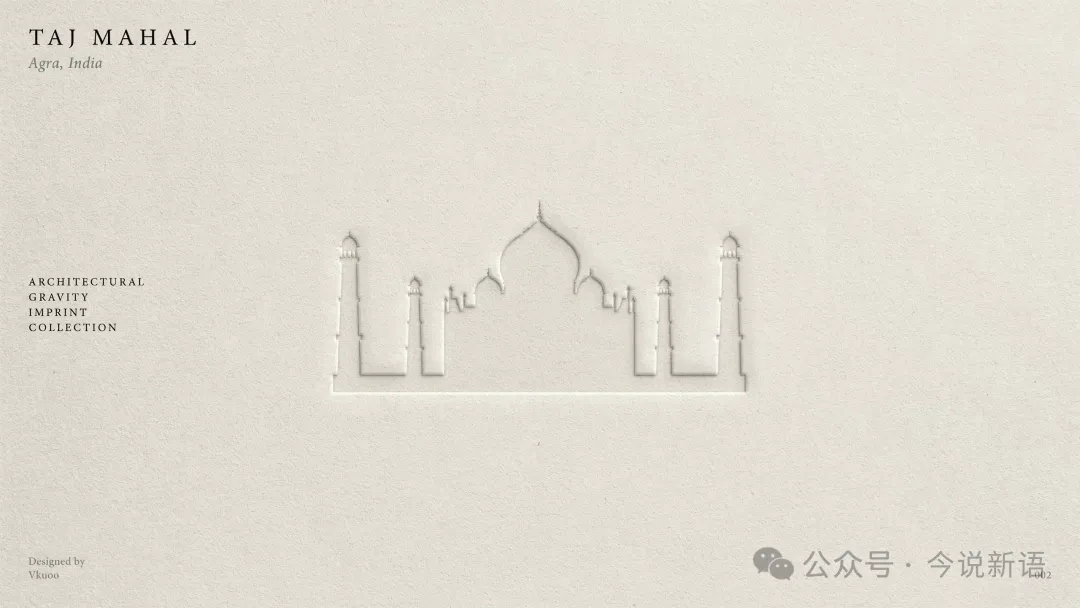
呢個紙雕風格嘅核心概念係「建築物本身消失,只留低輪廓印記」,透過特定嘅JSON結構控制構圖、紙張質感、光影效果同佈局,產生博物館級嘅展品效果。作者認為,比起單次Prompt,系統化嘅工作流先係更強嘅生產力工具。
文章末尾提供完整JSON提示模板,可以直接複製使用,只需修改建築名稱、城市、設計師等佔位符,就能生成屬於自己嘅紙雕風格建築名片。呢個資源對於想探索AI可控風格同工作流嘅讀者好有參考價值。
- 結論:AI Agent自我進化可以產生穩定又驚喜嘅風格,呢套紙雕模板經過多次迭代,適用多個模型。
- 方法:使用特定JSON結構描述建築物輪廓、紙張質感、光影效果,並強調「absence」——建築物消失,只留輪廓印象。
- 差異:與傳統Prompt不同,呢個模板透過結構化嘅參數控制,而非單一描述句,輸出更可控。
- 啟發:從GPTs到Skill,將對話助手轉化為可重複使用嘅工作流,係提升AI效率嘅關鍵。
- 可行動點:直接複製文末JSON模板,修改[BUILDING NAME]、[CITY]等佔位符,即可喺支援JSON prompt嘅工具中使用。
紙雕風格建築名片提示模板
完整JSON結構,描述建築輪廓、紙張質感、光影佈局,可直接複製使用。
由GPTs到Skill:AI Agent嘅進化之路
作者最近喺Codex搭建工作流同Agent時,發現AI生成嘅風格經常有意外驚喜。呢套紙雕風格就係AI Agent
多次演變後嘅結果
,從GPTs過渡到Skill,將「會傾偈嘅助手」真正變成「能幹活嘅流程」。佢仲提到Magnific將AI創意玩成咗「操作系統」,可見工作流整合嘅威力。
紙雕風格:建築物消失,輪廓留低
呢個風格最特別嘅地方係「
architecture absent
」——建築物本身完全消失,只留低 unmistakable 嘅正面輪廓,深深印喺紙張表面,形成一種博物館藏品級別嘅視覺效果。
silhouette imprint only
係核心描述,配合 warm ivory archival paper 質感同 soft grazing light,營造出 archival 氛圍。
- GPT Image-2:效果穩定,輪廓清晰。
- Google Banana系列:同樣有良好表現。
- Ideogram 4:生成結果帶有獨特嘅紙張紋理。
提示模板結構拆解
作者提供嘅JSON模板結構嚴謹,分為多個部分:subject、composition、imprint_style、background、lighting、layout、graphic_style同negative_prompt。每一個字段都精準控制生成效果。
composition
部分指定建築物置中、正面視角、大負空間,確保輪廓突出;
imprint_style
部分則詳細定義輪廓細節、壓印深度等,令效果更真實。
{"series": "Architectural Gravity Imprint Collection","subject": {"building_name": "[BUILDING NAME]","city": "[CITY]","country": "[COUNTRY]"},"composition": {"architecture_position": "perfectly centered","view": "front elevation","scale": "medium-large","negative_space": "very large","symmetry": "balanced museum poster layout","architecture_absent": true,"representation": "silhouette imprint only"},"imprint_style": {"description": "the architecture itself is completely absent, only its unmistakable front-elevation silhouette remains deeply impressed into the paper surface","detail_level": "minimal contour only","facade_details": false,"windows": false,"structural_details": false,"interior_details": false,"contour_recognition_priority": true,"emboss_depth": "subtle to medium","paper_compression": true,"architectural_memory_through_absence": true},"background": {"material": "warm ivory archival paper","texture": "fine linen fibers","color": "#ECE6DB","imperfections": "subtle paper grain","uniform_surface": true},"lighting": {"type": "soft grazing light","direction": "upper left","purpose": "reveal imprint depth","contrast": "low","mood": "museum archival"},"layout": {"top_left": ["[BUILDING NAME]","[CITY], [COUNTRY]"],"left_middle": ["ARCHITECTURAL","GRAVITY","IMPRINT","COLLECTION"],"bottom_left": ["Designed by","[DESIGNER NAME]"],"bottom_right": ["[COLLECTION NUMBER]"]},"graphic_style": {"editorial_design": true,"museum_catalog": true,"architectural_specimen": true,"premium_print_quality": true,"minimalist": true,"timeless": true,"calm": true},"negative_prompt": ["visible architecture","facade details","windows","ornaments","interior spaces","city context","street","people","vehicles","trees","sky","clouds","multiple shadows","dramatic lighting","perspective distortion","3d rendering look","clutter","extra objects","text inside architecture"]}點樣用呢個模板?
使用好簡單:
直接複製上面嘅JSON
,然後將其中嘅
佔位符
(例如[BUILDING NAME]、[CITY]、[DESIGNER NAME])改做你想用嘅內容。之後放入支援JSON prompt嘅AI繪圖工具(例如GPT Image-2、Ideogram 4等),就可以生成紙雕風格建築名片。
- 修改subject部分嘅building_name、city、country。
- 更新layout部分嘅top_left、bottom_left等文字資訊。
- 如果想調整風格,可以微調imprint_style或lighting參數。
{
"series": "Architectural Gravity Imprint Collection",
"subject": {
"building_name": "[BUILDING NAME]",
"city": "[CITY]",
"country": "[COUNTRY]"
},
"composition": {
"architecture_position": "perfectly centered",
"view": "front elevation",
"scale": "medium-large",
"negative_space": "very large",
"symmetry": "balanced museum poster layout",
"architecture_absent": true,
"representation": "silhouette imprint only"
},
"imprint_style": {
"description": "the architecture itself is completely absent, only its unmistakable front-elevation silhouette remains deeply impressed into the paper surface",
"detail_level": "minimal contour only",
"facade_details": false,
"windows": false,
"structural_details": false,
"interior_details": false,
"contour_recognition_priority": true,
"emboss_depth": "subtle to medium",
"paper_compression": true,
"architectural_memory_through_absence": true
},
"background": {
"material": "warm ivory archival paper",
"texture": "fine linen fibers",
"color": "#ECE6DB",
"imperfections": "subtle paper grain",
"uniform_surface": true
},
"lighting": {
"type": "soft grazing light",
"direction": "upper left",
"purpose": "reveal imprint depth",
"contrast": "low",
"mood": "museum archival"
},
"layout": {
"top_left": [
"[BUILDING NAME]",
"[CITY], [COUNTRY]"
],
```
"left_middle": [
  "ARCHITECTURAL",
  "GRAVITY",
  "IMPRINT",
  "COLLECTION"
],
"bottom_left": [
  "Designed by",
  "[DESIGNER NAME]"
],
"bottom_right": [
  "[COLLECTION NUMBER]"
]
```
},
"graphic_style": {
"editorial_design": true,
"museum_catalog": true,
"architectural_specimen": true,
"premium_print_quality": true,
"minimalist": true,
"timeless": true,
"calm": true
},
"negative_prompt": [
"visible architecture",
"facade details",
"windows",
"ornaments",
"interior spaces",
"city context",
"street",
"people",
"vehicles",
"trees",
"sky",
"clouds",
"multiple shadows",
"dramatic lighting",
"perspective distortion",
"3d rendering look",
"clutter",
"extra objects",
"text inside architecture"
]
}對AI工作流有興趣嘅可以睇前面嘅文章《鬥單個模型喇!即夢+可靈封神之後,中高級設計師嘅勝負手係工作流》。
公眾號精選內容
{
"series": "Architectural Gravity Imprint Collection",
"subject": {
"building_name": "[BUILDING NAME]",
"city": "[CITY]",
"country": "[COUNTRY]"
},
"composition": {
"architecture_position": "perfectly centered",
"view": "front elevation",
"scale": "medium-large",
"negative_space": "very large",
"symmetry": "balanced museum poster layout",
"architecture_absent": true,
"representation": "silhouette imprint only"
},
"imprint_style": {
"description": "the architecture itself is completely absent, only its unmistakable front-elevation silhouette remains deeply impressed into the paper surface",
"detail_level": "minimal contour only",
"facade_details": false,
"windows": false,
"structural_details": false,
"interior_details": false,
"contour_recognition_priority": true,
"emboss_depth": "subtle to medium",
"paper_compression": true,
"architectural_memory_through_absence": true
},
"background": {
"material": "warm ivory archival paper",
"texture": "fine linen fibers",
"color": "#ECE6DB",
"imperfections": "subtle paper grain",
"uniform_surface": true
},
"lighting": {
"type": "soft grazing light",
"direction": "upper left",
"purpose": "reveal imprint depth",
"contrast": "low",
"mood": "museum archival"
},
"layout": {
"top_left": [
"[BUILDING NAME]",
"[CITY], [COUNTRY]"
],
```
"left_middle": [
  "ARCHITECTURAL",
  "GRAVITY",
  "IMPRINT",
  "COLLECTION"
],
"bottom_left": [
  "Designed by",
  "[DESIGNER NAME]"
],
"bottom_right": [
  "[COLLECTION NUMBER]"
]
```
},
"graphic_style": {
"editorial_design": true,
"museum_catalog": true,
"architectural_specimen": true,
"premium_print_quality": true,
"minimalist": true,
"timeless": true,
"calm": true
},
"negative_prompt": [
"visible architecture",
"facade details",
"windows",
"ornaments",
"interior spaces",
"city context",
"street",
"people",
"vehicles",
"trees",
"sky",
"clouds",
"multiple shadows",
"dramatic lighting",
"perspective distortion",
"3d rendering look",
"clutter",
"extra objects",
"text inside architecture"
]
}對AI工作流感興趣的可以看前面的文章《卷單個模型了!即夢+可靈封神後,中高級設計師的勝負手是工作流》。
公眾號精選內容