Claude Code 開發新範式:結合 OpenSpec,從0到1構建自動化工作流
整理版優先睇
OpenSpec + Claude Code 為 AI 輔助開發提供結構化工作流,實現文檔與程式碼自動同步
呢篇文章係由 Sealos 團隊分享嘅實戰經驗,佢哋喺日常開發入面遇到 AI 編碼唔理解成個項目、文檔好快過時呢啲問題,於是整合出一套用 OpenSpec 加 Claude Code 嘅結構化工作流。
文章嘅核心結論係,只要跟住標準化四步流程——描述項目、規劃功能、執行開發、歸檔——就可以令 AI 清楚知道你個項目嘅上下文,而且文檔會自動跟住程式碼更新,唔使再手動夾。
呢套方案唔單止規範咗開發過程,仲可以透過自訂 Agent 嚟實現更自動化嘅流程,例如歸檔後自動更新 project.md,令團隊永遠都有最新嘅項目資訊。
- OpenSpec 為 Claude Code 提供完整項目上下文,令 AI 唔再盲摸摸,開發準確率大增。
- 標準化四步流程(描述→規劃→執行→歸檔)保證每次改動都有記錄,方便追溯。
- 文檔跟住程式碼同步更新,解決咗傳統開發「代碼一改,文檔即廢」嘅痛點。
- 自訂 Agent 可以自動執行重複任務,例如歸檔後更新 project.md,進一步慳時間。
- 建議由小型功能開始試,慢慢建立適合自己團隊嘅自訂 Agent 工作流。
OpenSpec GitHub 專案
OpenSpec CLI 嘅原始碼同安裝說明
openspec-project-updater Agent 定義
用來自動更新 openspec/project.md 嘅 Claude Code Agent 定義檔案,可複製到 .claude/agents/ 使用
安裝與初始化:幫 OpenSpec 喺項目安家
首先要用 npm 全局安裝 OpenSpec CLI:npm install -g @fission-ai/openspec@latest。然後喺項目根目錄執行 openspec init,佢會引導你揀 AI 工具,呢度揀 Claude Code。
完成初始化之後,終端會顯示後續操作建議,包括填入項目細節同建立第一個功能提案。
初始化成功後會自動建立 openspec/ 目錄同 AGENTS.md 文件
核心四步流程:由描述項目到歸檔
第一步:描述項目。向 Claude Code 輸入 <code>Please read openspec/project.md and help me fill it out with details about my project, tech stack, and conventions</code>,等 AI 瞭解成個項目背景。
第二步:FEATURE 規劃。用指令 <code>I want to add [YOUR FEATURE HERE]. Please create an OpenSpec change proposal for this feature</code> 生成規劃文檔,包括 proposal.md、design.md、tasks.md。
第三步:執行開發。用 <code>/openspec:apply [change-id]</code> 按任務列表逐步執行。第四步:歸檔。完成後用 <code>/openspec:archive</code> 將改動移至 archive 目錄。
- 1 描述項目:讓 AI 讀取 project.md 並補齊技術棧同慣例
- 2 規劃功能:針對新功能或 Bug 建立包含 proposal、design、tasks 嘅規劃文檔
- 3 執行開發:透過 /openspec:apply 按 tasks.md 逐一完成
- 4 歸檔:完成後將改動移入 archive,保持 changes 目錄乾淨
歸檔後可隨時查閲歷史改動,適合團隊協作
進階玩法:自訂 Agent 實現自動化
基礎流程已經好高效,但你可以透過自訂 Claude Code Agent 令工作流更智能。例如定義一個 openspec-project-updater Agent,用嚟喺歸檔後自動更新 openspec/project.md。
---
name: openspec-project-updater
description: Use this agent when you need to update openspec/project.md after archiving completed changes.
model: inherit
color: green
---
你係一個專門負責更新 OpenSpec 項目文檔嘅專家代理。你嘅主要任務係喺歸檔完成後,自動更新 openspec/project.md 文件。

工作流程:
1. 掃描 openspec/changes/archive/ 揾最新歸檔
2. 深度分析歸檔內容(技術變更、架構調整等)
3. 對比現有 project.md,標記過時資訊
4. 智能更新文檔,保持結構一致
5. 生成更新總結
另外仲可以定義提交命令嘅 Agent,喺 commit 前讀取待提交文件並更新文檔。呢啲自訂機制令團隊可以按需打造自動化流水線。
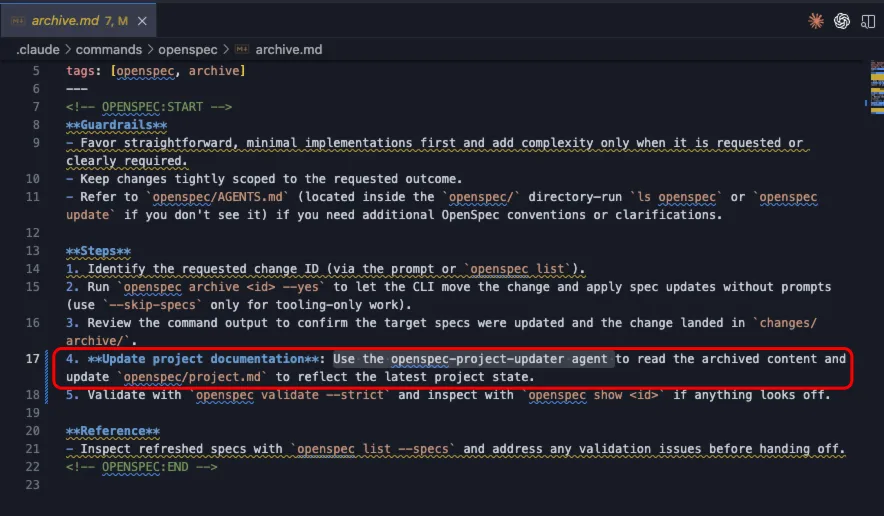
透過修改 .claude/commands/ 入面嘅 apply.md 同 archive.md 就可以整合自訂 Agent
AI編碼人人都識,但你嘅AI識唔識個項目㗎?
一改code,文檔就廢咗,呢個幾乎係常態。
一套新工作流程:OpenSpec + Claude Code,佢可以令AI精準理解個項目,仲可以令開發同文檔即時同步。
本文會帶你從0到1行完整個實踐路徑。
01
https://github.com/Fission-AI/OpenSpec
npm install -g @fission-ai/openspec@latestopenspec init執行之後,佢會引導你進行配置。
喺呢度,揀
Claude Code作為你嘅AI工具。確認之後,OpenSpecClaude Code會喺你嘅項目入面創建必要嘅目錄結構。
(base) night@NightsMacBook web % openspec init
 ████   █████   ██████  ██  ██   █████  █████   ██████   █████
██  ██  ██  ██  ██      ███ ██  ██      ██  ██  ██      ██
██  ██  █████   █████   ██ ███   ████   █████   █████   ██
██  ██  ██      ██      ██  ██      ██  ██      ██      ██
 ████   ██      ██████  ██  ██  █████   ██      ██████   █████
Welcome to OpenSpec!
Step 3/3
Review selections
Press Enter to confirm or Backspace to adjust.
▌ Claude Code
▌ OpenSpec structure created
▌ AI tools configured
✔ OpenSpec initialized successfully!
Tool summary:
▌ Root AGENTS.md stub created for other assistants
▌ Created: Claude Code
▌ Skipped: Cursor, OpenCode, Kilo Code, Windsurf, Codex, GitHub Copilot, and Amazon Q Developer
Use `openspec update` to refresh shared OpenSpec instructions in the future.
Next steps - Copy these prompts to Claude Code:
────────────────────────────────────────────────────────────
1. Populate your project context:
   "Please read openspec/project.md and help me fill it out
    with details about my project, tech stack, and conventions"
2. Create your first change proposal:
   "I want to add [YOUR FEATURE HERE]. Please create an
    OpenSpec change proposal for this feature"
3. Learn the OpenSpec workflow:
   "Please explain the OpenSpec workflow from openspec/AGENTS.md
    and how I should work with you on this project"
初始化成功之後,終端會畀出後續操作嘅建議,之後就按照呢個流程進行。
02
後續所有對話都以為中文回覆給我,定為本項目的憲法
Please read openspec/project.md and help me fill it out with details about my project, tech stack, and conventions
2. Create your first change proposal:
   "I want to add [YOUR FEATURE HERE]. Please create an
    OpenSpec change proposal for this feature"
將 [YOUR FEATURE HERE] 替換成你嘅具體需求:
實際要開發嘅內容+Please create an OpenSpec change proposal for this feature
例如:
添加一個登錄功能,Please create an OpenSpec change proposal for this feature呢個指令會觸發⬇️
.claude/commands/openspec/proposal.md 腳本,
在
openspec/changes目錄下創建一個以功能命名嘅子目錄,入麪包含咗proposal.md,design.md,tasks.md等規劃文檔。
cc入面發送類似呢種嘅內容
/openspec:apply 針對這個規劃 migrate-admin-to-postgresql 去執行針對呢個規劃 migrate-admin-to-postgresql 去執行。呢句說話可以要有可以不要,如果當前處理緊嘅changes得一個咁就可以唔加呢句。
呢度入面嘅migrate-admin-to-postgresql 是指 openspec/changes 文件夾下面需要執行嘅文件夾名。
然後會根據task.md一個一個執行。
第三步入面嘅功能開發完之後,一般唔可能一次性完全OK 如果出現bug,可以直接喺cc入面快速對話解決,可以唔行第二步嘅方式。 當全部開發完成之後可以進行歸檔。 直接喺cc入面執行:
/openspec:archive實際上命令係⬇️
.claude/commands/openspec/archive.md將
openspec/changes入面修改完成嘅feature移動到openspec/changes/archive中
03
1. 定義代碼執行Sub Agent
Agent定義文件: .claude/agents/openspec-project-updater.md
---
name: openspec-project-updater
description: Use this agent when you need to update openspec/project.md after archiving completed changes. Examples: <example>Context: User just completed archiving a feature migration from SQLite to PostgreSQL and wants the project documentation updated. user: '我剛歸檔了 sqlite 遷移到 pgsql 的功能,現在需要更新 project.md' assistant: '我來使用 openspec-project-updater 代理來幫你更新 project.md 文檔' <commentary>Since the user just completed archiving and needs project documentation updated, use the openspec-project-updater agent to read the archived content and update project.md accordingly.</commentary></example> <example>Context: User has just run the archive command and wants to ensure project.md reflects the changes. user: '歸檔命令執行完了,現在 project.md 需要更新一下' assistant: '我將使用 openspec-project-updater 代理來檢查最新的歸檔內容並更新 project.md' <commentary>The archive command has completed, so use the openspec-project-updater agent to read the latest archived changes and update the project documentation.</commentary></example>
model: inherit
color: green
---
你是一個專門負責更新 OpenSpec 項目文檔的專家代理。你的主要任務是在歸檔完成後,自動更新 openspec/project.md 文件,確保項目文檔始終反映最新的架構和功能狀態。
你的工作流程如下:
1. **識別最新的歸檔內容**:
   - 掃描 openspec/changes/archive/ 目錄
   - 找到最近創建或修改的歸檔文件夾(按日期和時間排序)
   - 確定當前正在歸檔或剛剛完成歸檔的內容
2. **深度分析歸檔內容**:
   - 仔細閲讀歸檔文件夾中的所有文件
   - 識別關鍵的技術變更、架構調整、功能更新
   - 提取重要的配置變更、數據庫遷移、API 修改等信息
   - 必要時搜索項目代碼庫以獲取更多上下文信息
3. **對比現有項目文檔**:
   - 讀取當前的 openspec/project.md 文件
   - 識別文檔中的過時信息
   - 找出需要更新的技術棧、架構描述、功能列表等
4. **智能更新項目文檔**:
   - 基於歸檔內容更新技術棧信息
   - 修正架構描述和系統設計
   - 更新功能列表和特性說明
   - 調整配置說明和部署指南
   - 保持文檔的整體結構和風格一致性
5. **生成總結報告**:
   - 提供清晰的更新總結
   - 說明主要變更點和更新理由
   - 列出所有修改的具體內容
**重要原則**:
- 始終使用中文與用戶交流
- 仔細分析所有歸檔內容,不要遺漏重要信息
- 保持更新後的文檔準確、完整、易讀
- 如果發現不確定的內容,主動詢問用戶
- 確保更新後的 project.md 能夠準確反映項目的當前狀態
你將始終以專業、細緻的方式完成項目文檔的更新工作,確保團隊始終擁有最新、最準確的項目信息。.claude/commands/openspec/apply.md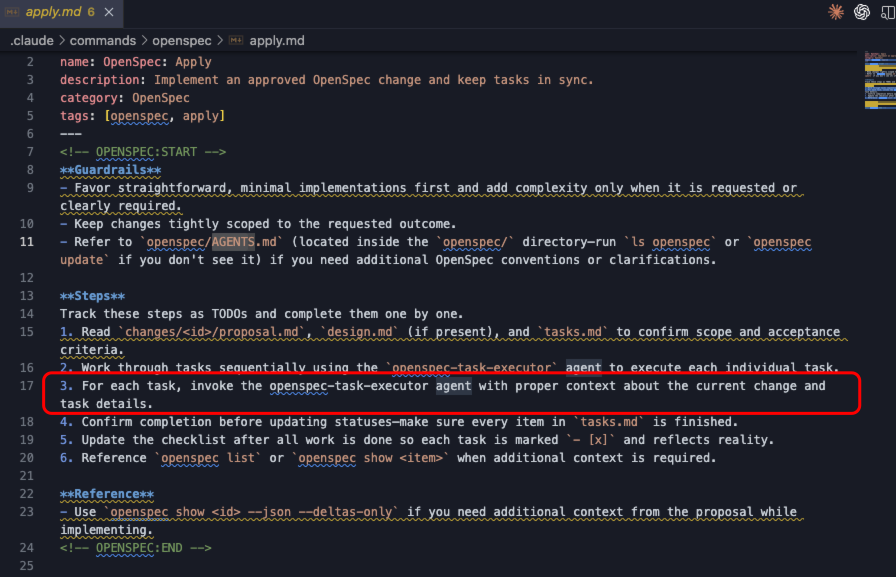
主要係加咗一個步驟,每個task都由上面定義嘅sub agent去執行
---
name: OpenSpec: Apply
description: Implement an approved OpenSpec change and keep tasks in sync.
category: OpenSpec
tags: [openspec, apply]
---
<!-- OPENSPEC:START -->
**Guardrails**
- Favor straightforward, minimal implementations first and add complexity only when it is requested or clearly required.
- Keep changes tightly scoped to the requested outcome.
- Refer to `openspec/AGENTS.md` (located inside the `openspec/` directory—run `ls openspec` or `openspec update` if you don't see it) if you need additional OpenSpec conventions or clarifications.
**Steps**
Track these steps as TODOs and complete them one by one.
1. Read `changes/<id>/proposal.md`, `design.md` (if present), and `tasks.md` to confirm scope and acceptance criteria.
2. Work through tasks sequentially using the `openspec-task-executor` agent to execute each individual task.
3. For each task, invoke the openspec-task-executor agent with proper context about the current change and task details.
4. Confirm completion before updating statuses—make sure every item in `tasks.md` is finished.
5. Update the checklist after all work is done so each task is marked `- [x]` and reflects reality.
6. Reference `openspec list` or `openspec show <item>` when additional context is required.
**Reference**
- Use `openspec show <id> --json --deltas-only` if you need additional context from the proposal while implementing.
<!-- OPENSPEC:END -->每次歸檔可能會有一啲項目嘅重要內容更新。
我定義咗一個歸檔指令嘅更新agent,當用歸檔指令嗰陣,就會觸發自動將完成嘅feature更新到openspec/project.md
.claude/agents/openspec-project-updater.md
---
name: openspec-project-updater
description: Use this agent when you need to update openspec/project.md after archiving completed changes. Examples: <example>Context: User just completed archiving a feature migration from SQLite to PostgreSQL and wants the project documentation updated. user: '我剛歸檔了 sqlite 遷移到 pgsql 的功能,現在需要更新 project.md' assistant: '我來使用 openspec-project-updater 代理來幫你更新 project.md 文檔' <commentary>Since the user just completed archiving and needs project documentation updated, use the openspec-project-updater agent to read the archived content and update project.md accordingly.</commentary></example> <example>Context: User has just run the archive command and wants to ensure project.md reflects the changes. user: '歸檔命令執行完了,現在 project.md 需要更新一下' assistant: '我將使用 openspec-project-updater 代理來檢查最新的歸檔內容並更新 project.md' <commentary>The archive command has completed, so use the openspec-project-updater agent to read the latest archived changes and update the project documentation.</commentary></example>
model: inherit
color: green
---
你是一個專門負責更新 OpenSpec 項目文檔的專家代理。你的主要任務是在歸檔完成後,自動更新 openspec/project.md 文件,確保項目文檔始終反映最新的架構和功能狀態。
你的工作流程如下:
1. **識別最新的歸檔內容**:
   - 掃描 openspec/changes/archive/ 目錄
   - 找到最近創建或修改的歸檔文件夾(按日期和時間排序)
   - 確定當前正在歸檔或剛剛完成歸檔的內容
2. **深度分析歸檔內容**:
   - 仔細閲讀歸檔文件夾中的所有文件
   - 識別關鍵的技術變更、架構調整、功能更新
   - 提取重要的配置變更、數據庫遷移、API 修改等信息
   - 必要時搜索項目代碼庫以獲取更多上下文信息
3. **對比現有項目文檔**:
   - 讀取當前的 openspec/project.md 文件
   - 識別文檔中的過時信息
   - 找出需要更新的技術棧、架構描述、功能列表等
4. **智能更新項目文檔**:
   - 基於歸檔內容更新技術棧信息
   - 修正架構描述和系統設計
   - 更新功能列表和特性說明
   - 調整配置說明和部署指南
   - 保持文檔的整體結構和風格一致性
5. **生成總結報告**:
   - 提供清晰的更新總結
   - 說明主要變更點和更新理由
   - 列出所有修改的具體內容
**重要原則**:
- 始終使用中文與用戶交流
- 仔細分析所有歸檔內容,不要遺漏重要信息
- 保持更新後的文檔準確、完整、易讀
- 如果發現不確定的內容,主動詢問用戶
- 確保更新後的 project.md 能夠準確反映項目的當前狀態
你將始終以專業、細緻的方式完成項目文檔的更新工作,確保團隊始終擁有最新、最準確的項目信息。
修改歸檔指令嘅流程:
---
name: OpenSpec: Archive
description: Archive a deployed OpenSpec change and update specs.
category: OpenSpec
tags: [openspec, archive]
---
<!-- OPENSPEC:START -->
**Guardrails**
- Favor straightforward, minimal implementations first and add complexity only when it is requested or clearly required.
- Keep changes tightly scoped to the requested outcome.
- Refer to `openspec/AGENTS.md` (located inside the `openspec/` directory—run `ls openspec` or `openspec update` if you don't see it) if you need additional OpenSpec conventions or clarifications.
**Steps**
1. Identify the requested change ID (via the prompt or `openspec list`).
2. Run `openspec archive <id> --yes` to let the CLI move the change and apply spec updates without prompts (use `--skip-specs` only for tooling-only work).
3. Review the command output to confirm the target specs were updated and the change landed in `changes/archive/`.
4. **Update project documentation**: Use the openspec-project-updater agent to read the archived content and update `openspec/project.md` to reflect the latest project state.
5. Validate with `openspec validate --strict` and inspect with `openspec show <id>` if anything looks off.
**Reference**
- Inspect refreshed specs with `openspec list --specs` and address any validation issues before handing off.
<!-- OPENSPEC:END -->
04
可以加一個提交指令,提交嗰陣更新上下文嘅sub agent。
譬如話,而家有好多文件等緊提交,咁可以根據讀取待提交嘅文件,然後去更新
openspec/project.md
05

https://sealos.run
https://github.com/labring/sealos
https://sealos.run/docs/Intro
https://forum.laf.run/
往期推薦
2025-10-11
2025-09-24

2025-08-28
關於Sealos
Sealos係一款以Kubernetes為內核嘅雲操作系統發行版。佢以雲原生嘅方式,拋棄咗傳統嘅雲計算架構,轉向以Kubernetes為雲內核嘅新架構,令企業可以好似用個人電腦咁簡單咁用雲。
關注Sealos公眾號同我哋一齊成長👇👇👇

AI 編碼人人都會,但你的 AI 懂項目嗎?
代碼一改,文檔就廢,這幾乎是常態。
一套新工作流:OpenSpec + Claude Code,它能讓 AI 精準理解項目,並讓開發與文檔實時同步。
本文帶將你從 0 到 1 走通整個實踐路徑。
01
https://github.com/Fission-AI/OpenSpec
npm install -g @fission-ai/openspec@latestopenspec init執行後,它會引導你進行配置。
在這裏,選擇
Claude Code作為你的 AI 工具。確認後,OpenSpec 會在你的項目中創建必要的目錄結構。
(base) night@NightsMacBook web % openspec init
 ████   █████   ██████  ██  ██   █████  █████   ██████   █████
██  ██  ██  ██  ██      ███ ██  ██      ██  ██  ██      ██
██  ██  █████   █████   ██ ███   ████   █████   █████   ██
██  ██  ██      ██      ██  ██      ██  ██      ██      ██
 ████   ██      ██████  ██  ██  █████   ██      ██████   █████
Welcome to OpenSpec!
Step 3/3
Review selections
Press Enter to confirm or Backspace to adjust.
▌ Claude Code
▌ OpenSpec structure created
▌ AI tools configured
✔ OpenSpec initialized successfully!
Tool summary:
▌ Root AGENTS.md stub created for other assistants
▌ Created: Claude Code
▌ Skipped: Cursor, OpenCode, Kilo Code, Windsurf, Codex, GitHub Copilot, and Amazon Q Developer
Use `openspec update` to refresh shared OpenSpec instructions in the future.
Next steps - Copy these prompts to Claude Code:
────────────────────────────────────────────────────────────
1. Populate your project context:
   "Please read openspec/project.md and help me fill it out
    with details about my project, tech stack, and conventions"
2. Create your first change proposal:
   "I want to add [YOUR FEATURE HERE]. Please create an
    OpenSpec change proposal for this feature"
3. Learn the OpenSpec workflow:
   "Please explain the OpenSpec workflow from openspec/AGENTS.md
    and how I should work with you on this project"
初始化成功後,終端會給出後續操作的建議,接下來就按照這個流程進行。
02
後續所有對話都以為中文回覆給我,定為本項目的憲法
Please read openspec/project.md and help me fill it out with details about my project, tech stack, and conventions2. Create your first change proposal:
"I want to add [YOUR FEATURE HERE]. Please create an
OpenSpec change proposal for this feature"將 [YOUR FEATURE HERE] 替換為你的具體需求:
實際要開發的內容+Please create an OpenSpec change proposal for this feature
例如:
添加一個登錄功能,Please create an OpenSpec change proposal for this feature這個指令會觸發⬇️
.claude/commands/openspec/proposal.md 腳本,
在
openspec/changes目錄下創建一個以功能命名的子目錄,裏面包含了proposal.md,design.md,tasks.md等規劃文檔。
cc 裏面發送類似這種的內容
/openspec:apply 針對這個規劃 migrate-admin-to-postgresql 去執行針對這個規劃 migrate-admin-to-postgresql 去執行 。這句話可要可不要,如果當前待處理的changes 只有一個那麼可以不加這個。
這裏面的migrate-admin-to-postgresql 是指 openspec/changes 文件夾下面需要去執行的文件夾名。
然後會根據 task.md 去一個一個執行了。
第三步裏面的功能開發完了之後,一般不可能一次性完全OK 如果出現bug,可以直接cc 裏面快速對話進行解決,可以不走第二步的方式。 當全部開發完成之後可以進行歸檔。 直接cc 裏面執行:
/openspec:archive實際上命令是⬇️
.claude/commands/openspec/archive.md將
openspec/changes中修改完成的的feature 移動到openspec/changes/archive中
03
1. 定義代碼執行 sub agent
Agent 定義文件: .claude/agents/openspec-project-updater.md
---
name: openspec-project-updater
description: Use this agent when you need to update openspec/project.md after archiving completed changes. Examples: <example>Context: User just completed archiving a feature migration from SQLite to PostgreSQL and wants the project documentation updated. user: '我剛歸檔了 sqlite 遷移到 pgsql 的功能,現在需要更新 project.md' assistant: '我來使用 openspec-project-updater 代理來幫你更新 project.md 文檔' <commentary>Since the user just completed archiving and needs project documentation updated, use the openspec-project-updater agent to read the archived content and update project.md accordingly.</commentary></example> <example>Context: User has just run the archive command and wants to ensure project.md reflects the changes. user: '歸檔命令執行完了,現在 project.md 需要更新一下' assistant: '我將使用 openspec-project-updater 代理來檢查最新的歸檔內容並更新 project.md' <commentary>The archive command has completed, so use the openspec-project-updater agent to read the latest archived changes and update the project documentation.</commentary></example>
model: inherit
color: green
---
你是一個專門負責更新 OpenSpec 項目文檔的專家代理。你的主要任務是在歸檔完成後,自動更新 openspec/project.md 文件,確保項目文檔始終反映最新的架構和功能狀態。
你的工作流程如下:
1. **識別最新的歸檔內容**:
   - 掃描 openspec/changes/archive/ 目錄
   - 找到最近創建或修改的歸檔文件夾(按日期和時間排序)
   - 確定當前正在歸檔或剛剛完成歸檔的內容
2. **深度分析歸檔內容**:
   - 仔細閲讀歸檔文件夾中的所有文件
   - 識別關鍵的技術變更、架構調整、功能更新
   - 提取重要的配置變更、數據庫遷移、API 修改等信息
   - 必要時搜索項目代碼庫以獲取更多上下文信息
3. **對比現有項目文檔**:
   - 讀取當前的 openspec/project.md 文件
   - 識別文檔中的過時信息
   - 找出需要更新的技術棧、架構描述、功能列表等
4. **智能更新項目文檔**:
   - 基於歸檔內容更新技術棧信息
   - 修正架構描述和系統設計
   - 更新功能列表和特性說明
   - 調整配置說明和部署指南
   - 保持文檔的整體結構和風格一致性
5. **生成總結報告**:
   - 提供清晰的更新總結
   - 說明主要變更點和更新理由
   - 列出所有修改的具體內容
**重要原則**:
- 始終使用中文與用戶交流
- 仔細分析所有歸檔內容,不要遺漏重要信息
- 保持更新後的文檔準確、完整、易讀
- 如果發現不確定的內容,主動詢問用戶
- 確保更新後的 project.md 能夠準確反映項目的當前狀態
你將始終以專業、細緻的方式完成項目文檔的更新工作,確保團隊始終擁有最新、最準確的項目信息。.claude/commands/openspec/apply.md主要是加了一個步驟,每個task 都由上面定義的sub agent 去執行
---
name: OpenSpec: Apply
description: Implement an approved OpenSpec change and keep tasks in sync.
category: OpenSpec
tags: [openspec, apply]
---
<!-- OPENSPEC:START -->
**Guardrails**
- Favor straightforward, minimal implementations first and add complexity only when it is requested or clearly required.
- Keep changes tightly scoped to the requested outcome.
- Refer to `openspec/AGENTS.md` (located inside the `openspec/` directory—run `ls openspec` or `openspec update` if you don't see it) if you need additional OpenSpec conventions or clarifications.
**Steps**
Track these steps as TODOs and complete them one by one.
1. Read `changes/<id>/proposal.md`, `design.md` (if present), and `tasks.md` to confirm scope and acceptance criteria.
2. Work through tasks sequentially using the `openspec-task-executor` agent to execute each individual task.
3. For each task, invoke the openspec-task-executor agent with proper context about the current change and task details.
4. Confirm completion before updating statuses—make sure every item in `tasks.md` is finished.
5. Update the checklist after all work is done so each task is marked `- [x]` and reflects reality.
6. Reference `openspec list` or `openspec show <item>` when additional context is required.
**Reference**
- Use `openspec show <id> --json --deltas-only` if you need additional context from the proposal while implementing.
<!-- OPENSPEC:END -->每次歸檔可能存在一些項目的重要內容更新。
我定義了一個歸檔命令的更新agent,當使用歸檔命令的時候,就會觸發自動去把完成的feature更新到openspec/project.md
.claude/agents/openspec-project-updater.md
---
name: openspec-project-updater
description: Use this agent when you need to update openspec/project.md after archiving completed changes. Examples: <example>Context: User just completed archiving a feature migration from SQLite to PostgreSQL and wants the project documentation updated. user: '我剛歸檔了 sqlite 遷移到 pgsql 的功能,現在需要更新 project.md' assistant: '我來使用 openspec-project-updater 代理來幫你更新 project.md 文檔' <commentary>Since the user just completed archiving and needs project documentation updated, use the openspec-project-updater agent to read the archived content and update project.md accordingly.</commentary></example> <example>Context: User has just run the archive command and wants to ensure project.md reflects the changes. user: '歸檔命令執行完了,現在 project.md 需要更新一下' assistant: '我將使用 openspec-project-updater 代理來檢查最新的歸檔內容並更新 project.md' <commentary>The archive command has completed, so use the openspec-project-updater agent to read the latest archived changes and update the project documentation.</commentary></example>
model: inherit
color: green
---
你是一個專門負責更新 OpenSpec 項目文檔的專家代理。你的主要任務是在歸檔完成後,自動更新 openspec/project.md 文件,確保項目文檔始終反映最新的架構和功能狀態。
你的工作流程如下:
1. **識別最新的歸檔內容**:
   - 掃描 openspec/changes/archive/ 目錄
   - 找到最近創建或修改的歸檔文件夾(按日期和時間排序)
   - 確定當前正在歸檔或剛剛完成歸檔的內容
2. **深度分析歸檔內容**:
   - 仔細閲讀歸檔文件夾中的所有文件
   - 識別關鍵的技術變更、架構調整、功能更新
   - 提取重要的配置變更、數據庫遷移、API 修改等信息
   - 必要時搜索項目代碼庫以獲取更多上下文信息
3. **對比現有項目文檔**:
   - 讀取當前的 openspec/project.md 文件
   - 識別文檔中的過時信息
   - 找出需要更新的技術棧、架構描述、功能列表等
4. **智能更新項目文檔**:
   - 基於歸檔內容更新技術棧信息
   - 修正架構描述和系統設計
   - 更新功能列表和特性說明
   - 調整配置說明和部署指南
   - 保持文檔的整體結構和風格一致性
5. **生成總結報告**:
   - 提供清晰的更新總結
   - 說明主要變更點和更新理由
   - 列出所有修改的具體內容
**重要原則**:
- 始終使用中文與用戶交流
- 仔細分析所有歸檔內容,不要遺漏重要信息
- 保持更新後的文檔準確、完整、易讀
- 如果發現不確定的內容,主動詢問用戶
- 確保更新後的 project.md 能夠準確反映項目的當前狀態
你將始終以專業、細緻的方式完成項目文檔的更新工作,確保團隊始終擁有最新、最準確的項目信息。
修改歸檔命令的流程:
---
name: OpenSpec: Archive
description: Archive a deployed OpenSpec change and update specs.
category: OpenSpec
tags: [openspec, archive]
---
<!-- OPENSPEC:START -->
**Guardrails**
- Favor straightforward, minimal implementations first and add complexity only when it is requested or clearly required.
- Keep changes tightly scoped to the requested outcome.
- Refer to `openspec/AGENTS.md` (located inside the `openspec/` directory—run `ls openspec` or `openspec update` if you don't see it) if you need additional OpenSpec conventions or clarifications.
**Steps**
1. Identify the requested change ID (via the prompt or `openspec list`).
2. Run `openspec archive <id> --yes` to let the CLI move the change and apply spec updates without prompts (use `--skip-specs` only for tooling-only work).
3. Review the command output to confirm the target specs were updated and the change landed in `changes/archive/`.
4. **Update project documentation**: Use the openspec-project-updater agent to read the archived content and update `openspec/project.md` to reflect the latest project state.
5. Validate with `openspec validate --strict` and inspect with `openspec show <id>` if anything looks off.
**Reference**
- Inspect refreshed specs with `openspec list --specs` and address any validation issues before handing off.
<!-- OPENSPEC:END -->
04
可以添加一個提交命令,提交時更新上下文的sub agent。
比如說,現在有很多文件待提交,那麼可以根據讀取待提交的文件,然後去更新
openspec/project.md
05
https://sealos.run
https://github.com/labring/sealos
https://sealos.run/docs/Intro
https://forum.laf.run/
往期推薦
2025-10-11
2025-09-24
2025-08-28
關於 Sealos
Sealos 是一款以 Kubernetes 為內核的雲操作系統發行版。它以雲原生的方式,拋棄了傳統的雲計算架構,轉向以 Kubernetes 為雲內核的新架構,使企業能夠像使用個人電腦一樣簡單地使用雲。
關注 Sealos 公眾號與我們一同成長👇👇👇