GPT Image 2 提示詞倉庫我只推這一個,附 7 個能直接抄的 prompt

作者:戴衞得
日期:2026年5月2日 上午12:53
來源:WeChat 原文

整理版優先睇

速讀 5 個重點 高亮

GitHub GPT Image 2 prompt 倉庫推薦:7 個即用即改嘅模板,識抄就係贏

整理版摘要

作者戴衞得,一個 Base 倫敦嘅 AI 分享者,喺 GPT Image 2 出咗之後,見到網上好多 prompt 教學但多數唔實用。佢親自翻曬 GitHub 上幾個 prompt 倉庫,最後只留低一個:Anil-matcha/Awesome-GPT-Image-2-API-Prompts。

呢個倉庫有 1.8k star,每條 prompt 都係「能直接交稿」級別,分六大類:人像攝影、海報插畫、遊戲截圖、UI/UX 設計、角色設計、信息圖排版。作者揀咗 7 條最值得抄嘅 prompt 示範,包括城市海報、宋朝社交媒體、茶飲海報、博物館信息圖、夜景人像、咖啡溯源圖、表情網格,全部可以複製改寫。

整體結論:AI 時代最緊要係「識得企喺巨人膊頭上」,識抄同改寫 prompt 比起由零開始寫更有效率。讀者只要跟住三步法(複製、替換關鍵詞、扔畀 ChatGPT 生成),就可以快靚正出圖。

  • 推薦 GitHub 倉庫 Anil-matcha/Awesome-GPT-Image-2-API-Prompts,prompt 結構化可改造,每條都係「能直接交稿」級別。
  • 使用三步法:喺倉庫揾適合 prompt 複製、將地標或品牌名等關鍵詞換成自己嘅、直接扔畀 ChatGPTCodex 生成。
  • 呢啲 prompt 係「模板式」設計,唔係一次性,可以靈活套用到唔同場景,例如將 Boston Spring 改做杭州春季海報。
  • AI 時代最稀缺嘅能力係「識抄」,而唔係由零創造;識得用前人成果先係清醒嘅打法。
  • 7 條即用 prompt 涵蓋海報、社交媒體、信息圖、人像、表情等,直接抄就得,適合內容創作者、設計師同品牌方。
值得記低
連結 github.com

Awesome-GPT-Image-2-API-Prompts

GitHub 倉庫,包含大量 GPT Image 2 結構化 prompt 模板,分 6 大類,全部免費公開。

整理重點

點解呢個倉庫值得推薦

倉庫叫 Awesome-GPT-Image-2-API-Prompts,有 1.8k star。星數唔係重點,重點係佢每一條 prompt 都係「能直接交稿」嘅水平,唔似其他倉庫啲 prompt 要自己執一大輪先用到。

倉庫將 prompt 分成 6 大類

  1. 1 人像攝影:模擬不同攝影風格,例如 35mm 菲林、便利店冷光等。
  2. 2 海報插畫:城市主題海報、品牌海報,層級分明。
  3. 3 遊戲截圖:可以生成遊戲場景截圖風格。
  4. 4 UI/UX 設計:生成 App 介面或網站 mockup。
  5. 5 角色設計:保持角色一致性嘅表情網格。
  6. 6 信息圖排版:博物館展板風格、科普信息圖。

每條 prompt 都係結構化模板,唔係單一關鍵詞堆砌,而係一篇完整嘅設計 brief,令 AI 精準理解你嘅意圖。

整理重點

7 個最值得抄嘅 Prompt

以下係作者由倉庫揀出嚟嘅 7 條 prompt,全部可以直接用或者改少少。

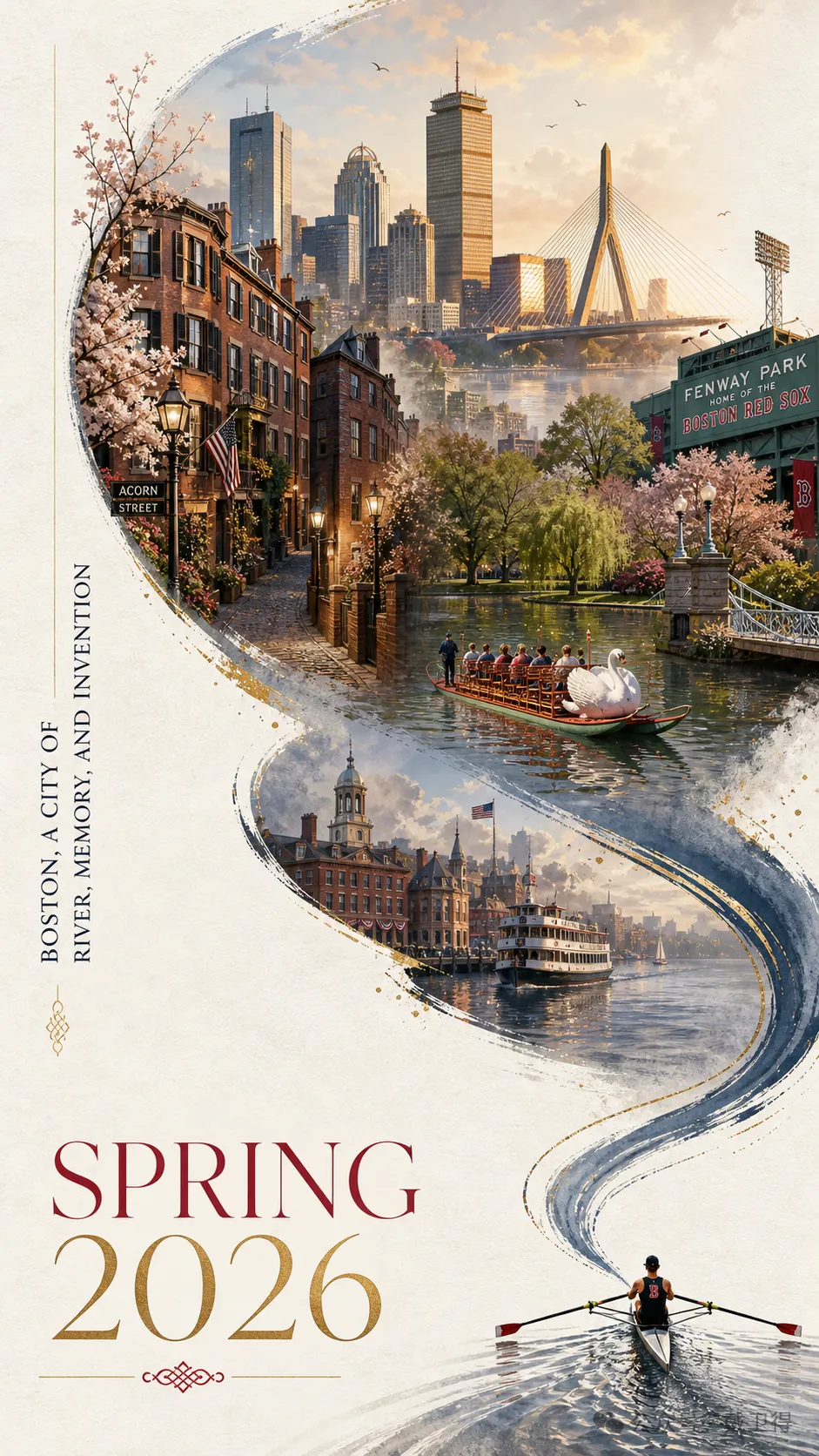
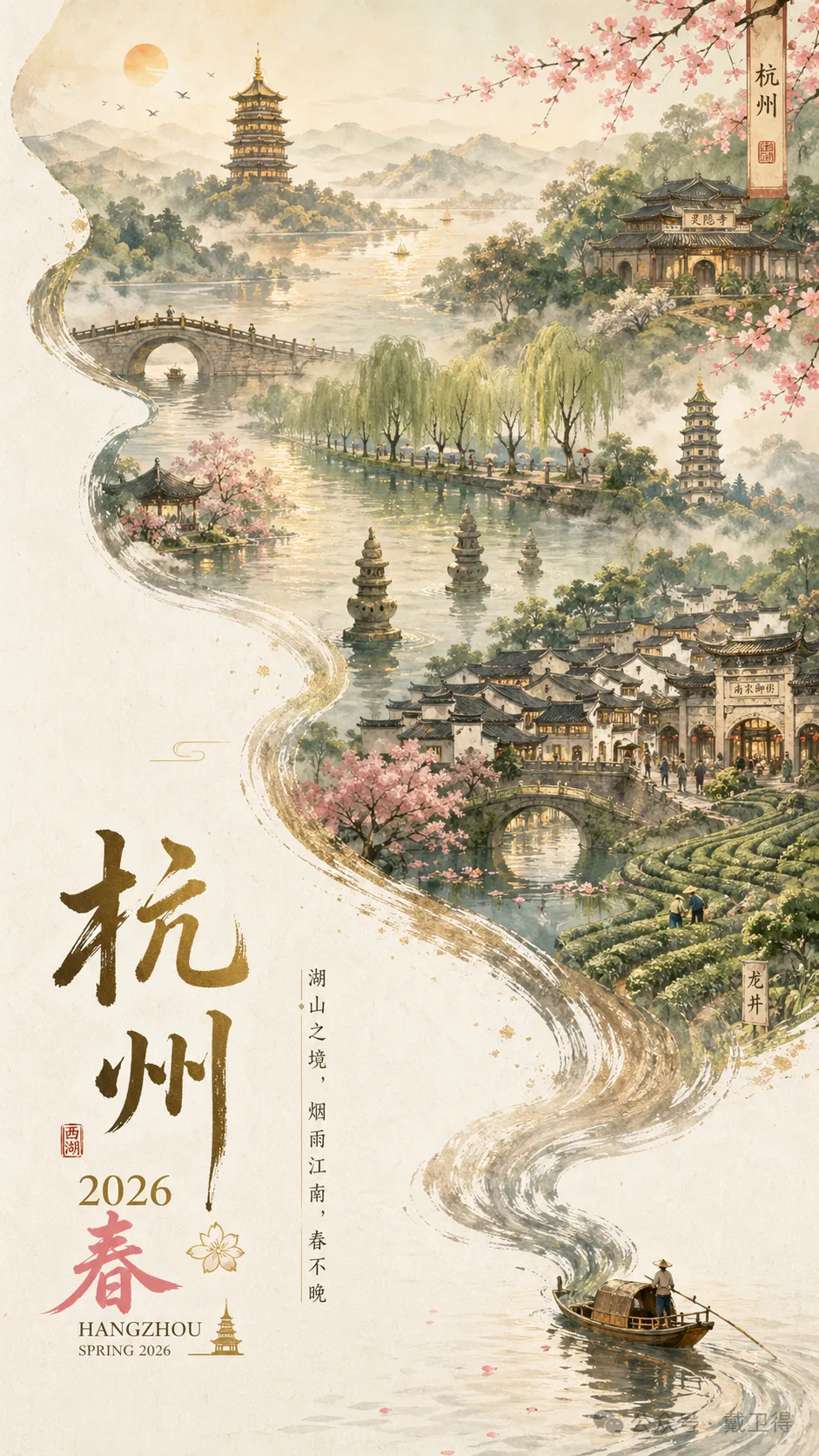
1. 城市春季海報(Boston Spring)——呢條 prompt 嘅結構好巧妙:一隻小船劃過水面,水流順住畫面向上延伸,變成河道形狀嘅城市全景。作者將 Charles River 改做西湖,Beacon Hill 改做雷峯塔,Acorn Street 改做斷橋,1 分鐘就出到杭州春季海報。

結構化模板可改造」——呢句係呢個倉庫嘅精髓。一條好 prompt 唔係等你照抄,而係等你拆解學習。

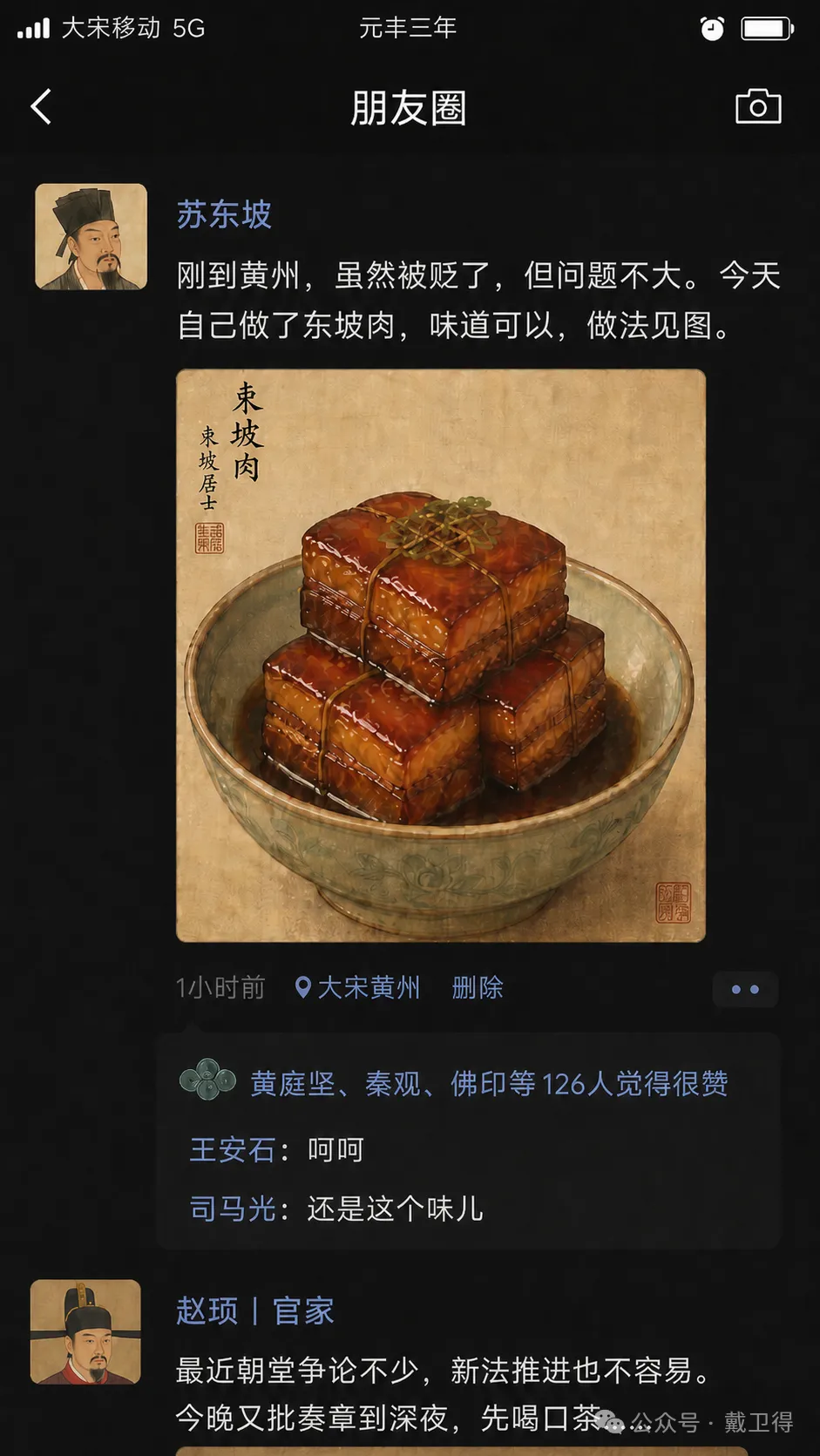
2. 宋朝社交媒體(穿越梗自帶傳播)——呢條 prompt 生成一幅「假如宋朝人有微信朋友圈」嘅截圖,蘇東坡發東坡肉,王安石點讚,司馬光留言。key point 係將現代社交 App 元素全部保留,但內容換成宋朝語境。

文化加穿越梗係社交媒體硬通貨,歷史文化類帳號必抄。

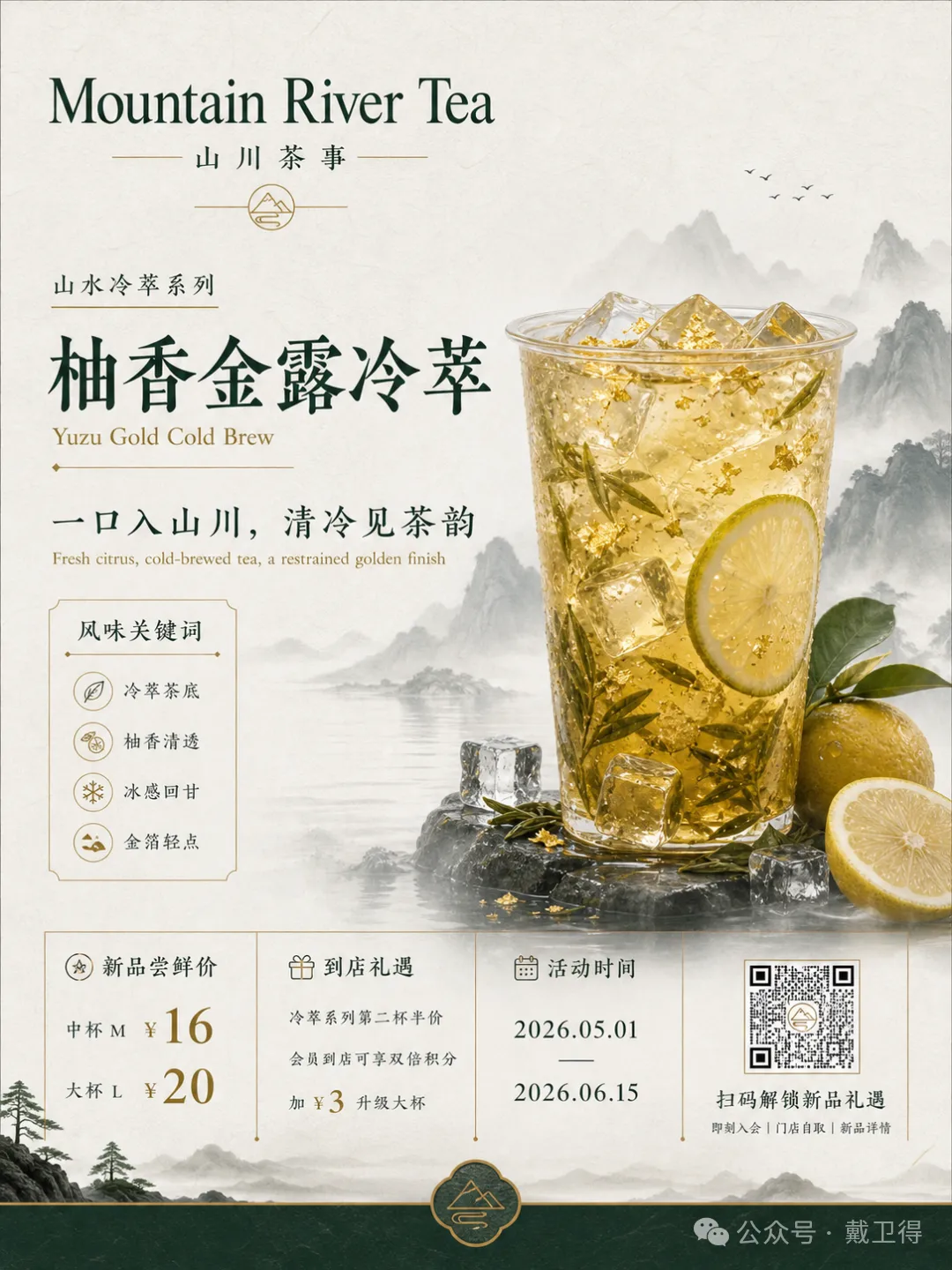
3. 山河茶飲海報(新中式國潮)——呢條 prompt 精確控制文字層級:品牌名、產品名、系列名、標語、限時價格、活動日期、QR code 位,全部清楚列出。用墨綠、米白、金色,強調宣紙質感同留白。

顏色同字體層級都交由 AI 按設計師方式排版,唔係 AI 亂湊。

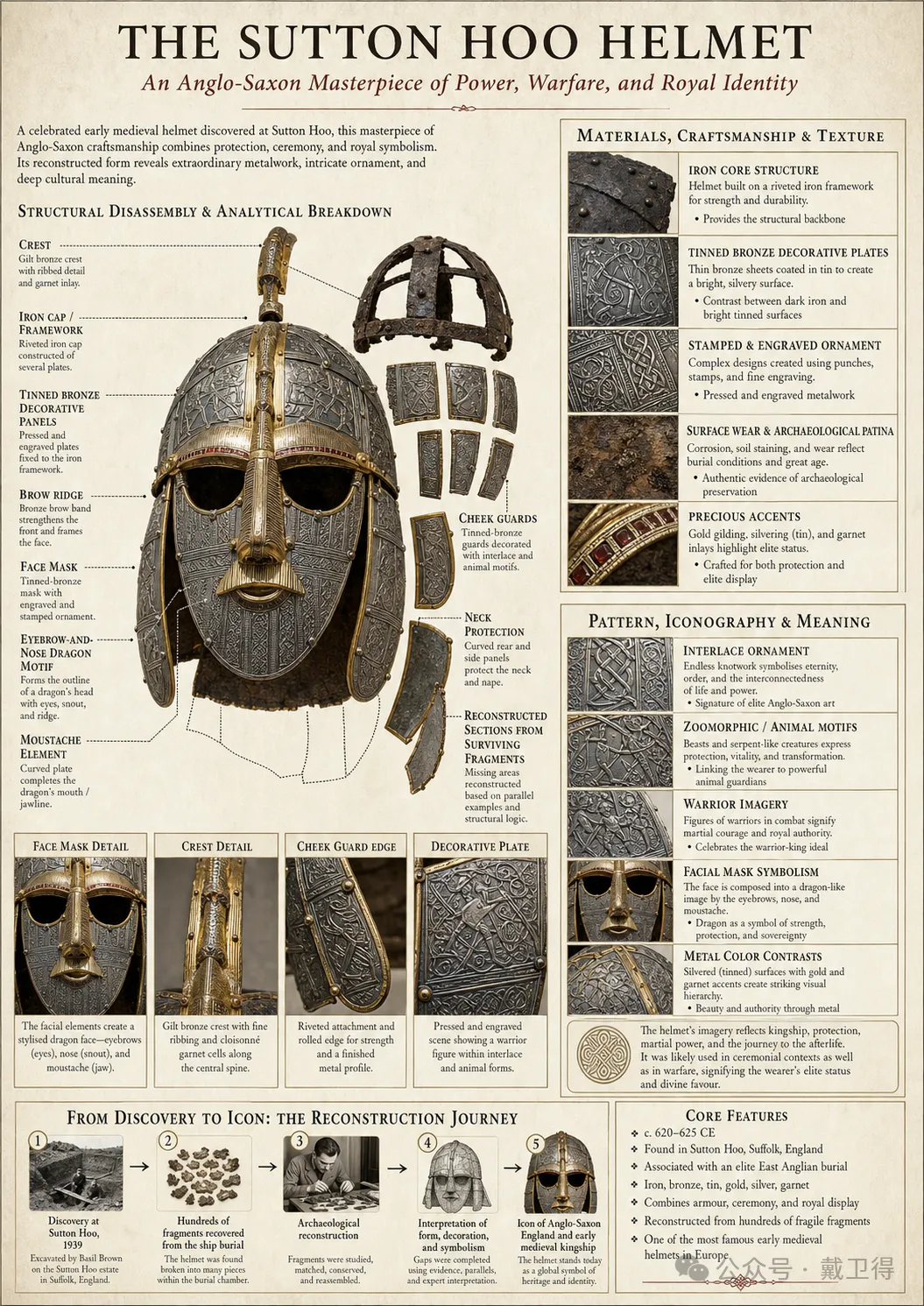
4. 博物館藏品信息圖(Rosetta Stone)——呢條 prompt 生成博物館解說牌風格嘅信息圖,包含主體寫實圖、結構拆解、材質工藝、紋樣含義、色彩說明、核心特徵總結。prompt 入面有個關鍵詞 automatically determine the most appropriate subject structure,即係你畀一個主題,AI 自己決定點排版。

呢種圖自己拉 Figma 至少半日,而家 AI 30 秒出到。

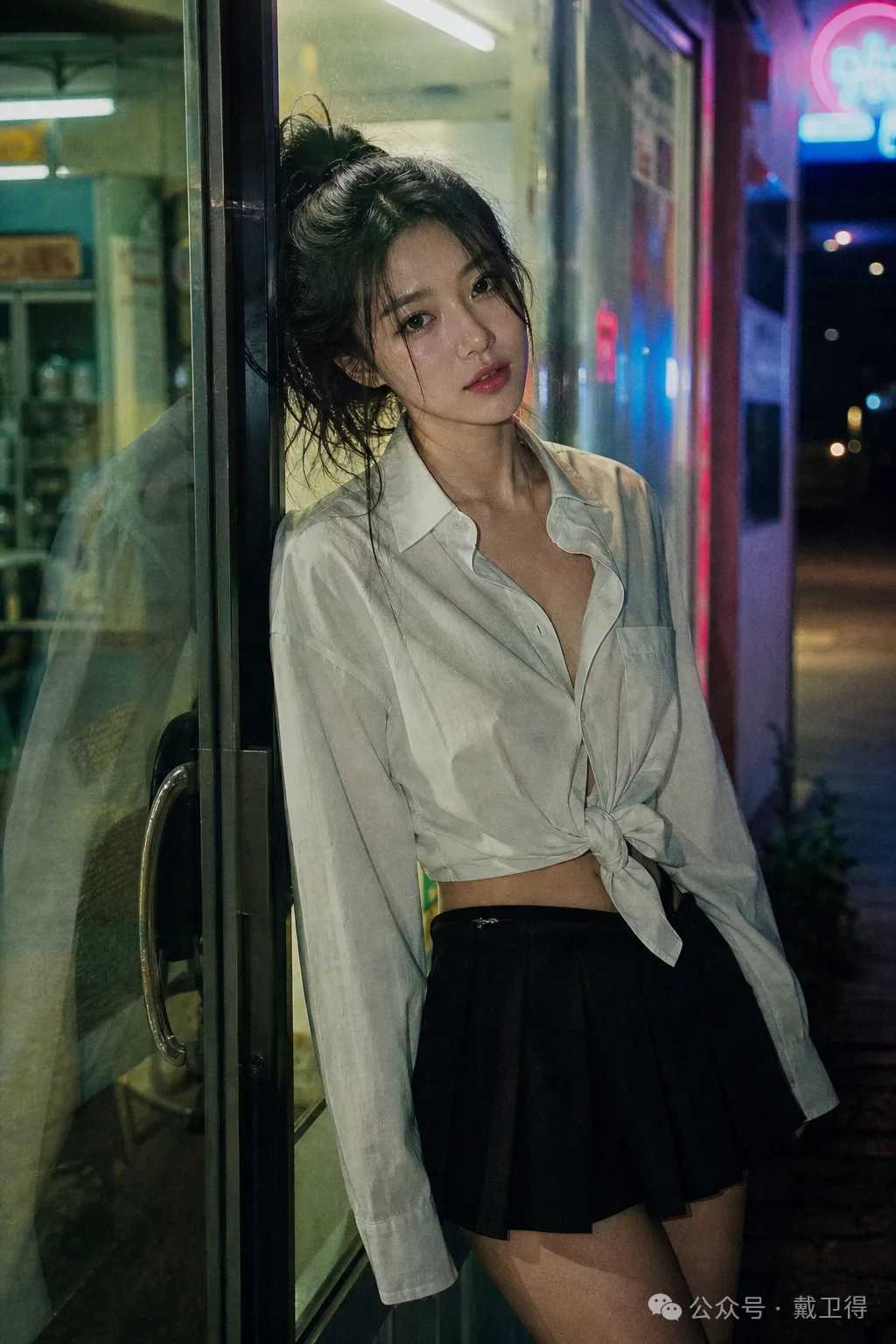
5. 35mm 便利店夜景人像——呢條 prompt 好長好長,但精確控制所有攝影細節:35mm 菲林、便利店冷白光 mixed 霓虹燈、真實皮膚質感加微毛孔。Midjourney 時代用唔到咁長 prompt,但 GPT-4o 食得哂。

呢條係「超長寫實 prompt」嘅代表作,將 prompt 當攝影 brief 嚟寫。

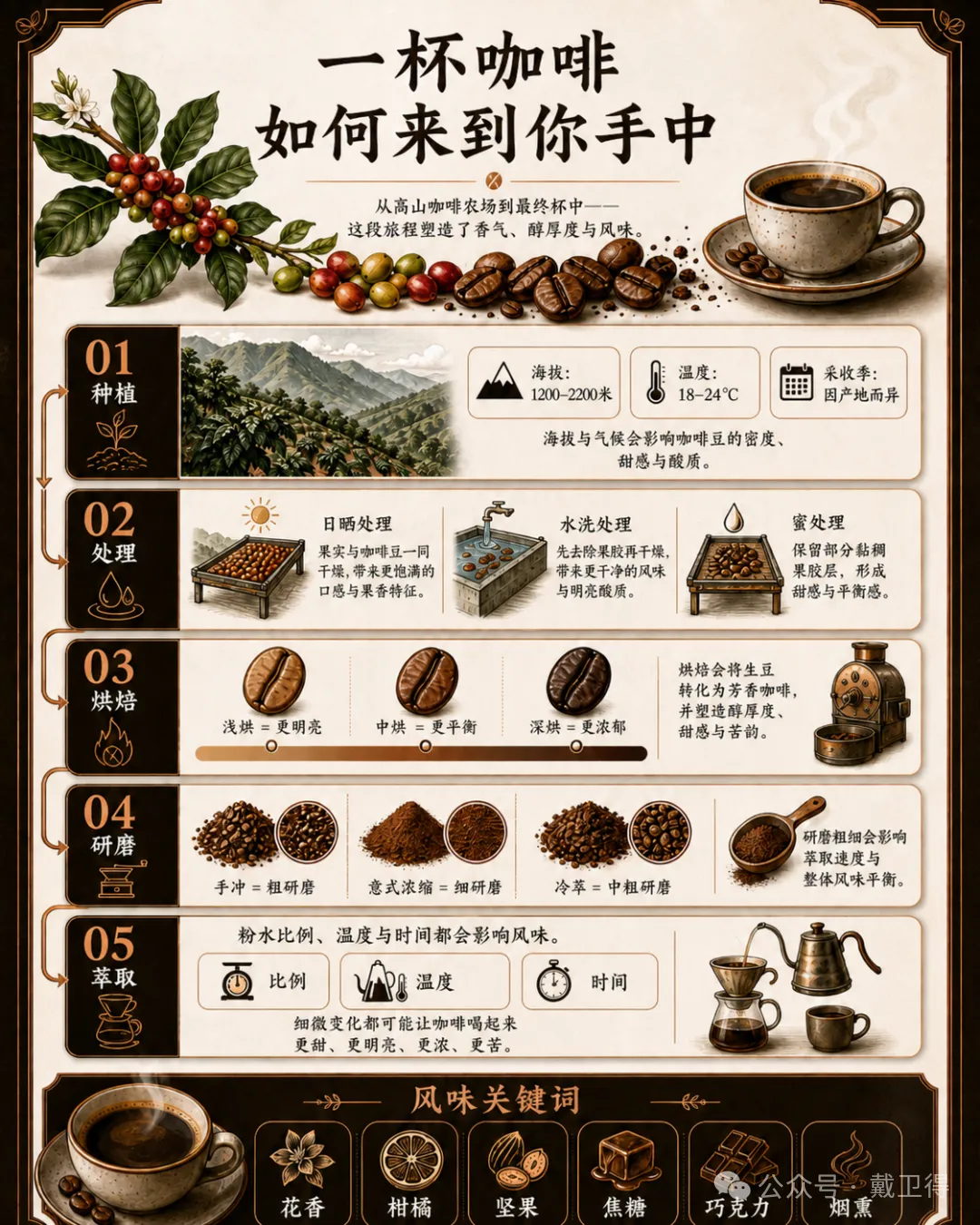
6. 咖啡溯源信息圖——將一杯咖啡由種植到萃取分 5 步,每步有具體數據,出嚟係一張完整嘅信息長圖。換主題(奶茶、葡萄酒、朱古力)就可以無限複製。

呢種圖自己做 Figma 要半天,AI 30 秒,仲要係高質 display board 級別。

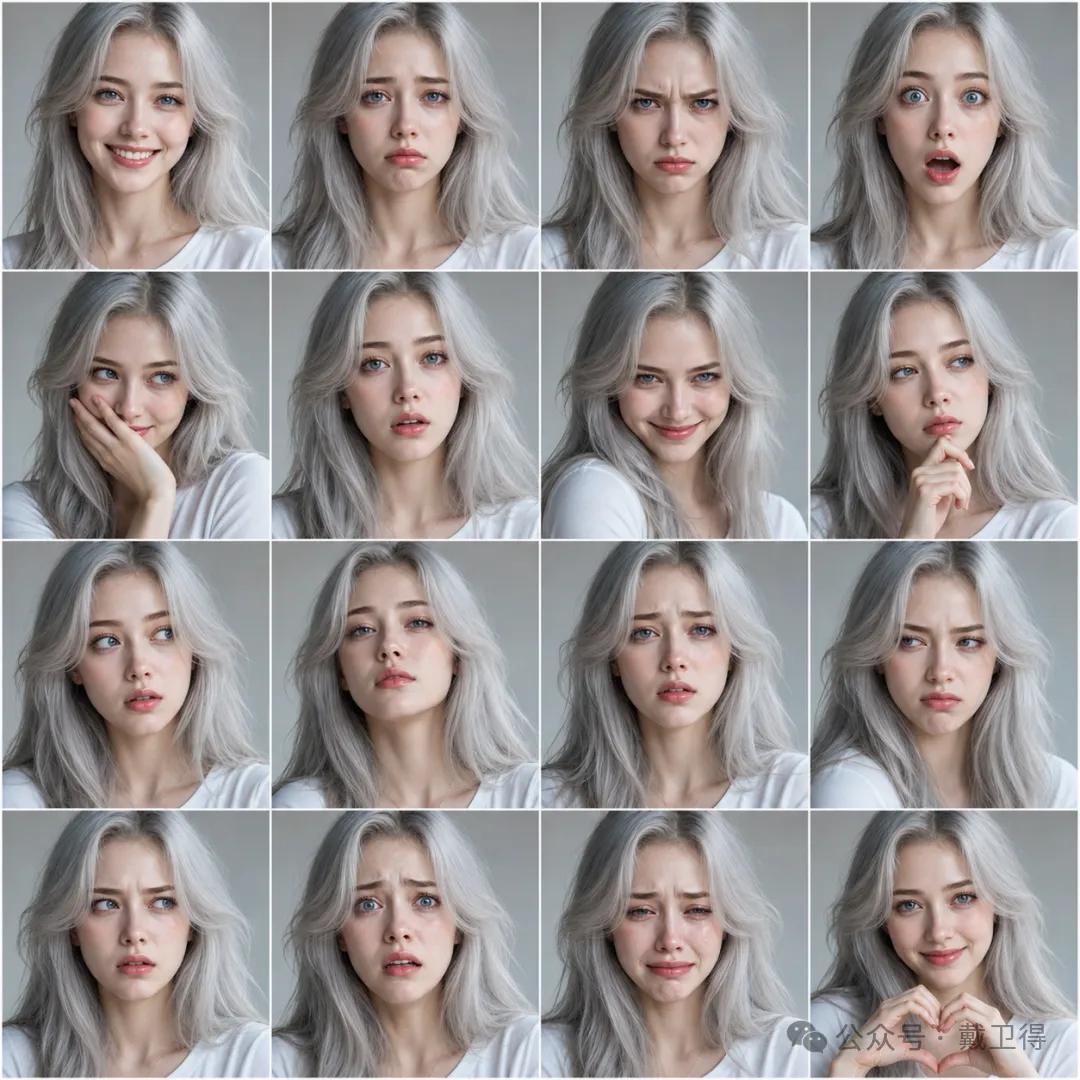
7. 16 面板表情網格——一張圖生成同一個角色嘅 16 種表情,面部、髮型、服裝保持高度一致。呢個係 GPT-4o 嘅「角色一致性」能力,Diffusion 時代根本做唔到。

一次生成等於一週工作量,做 IP 同漫畫人物嘅必抄。

整理重點

點樣用?三步抄出大片

倉庫介紹完,實際用起嚟好簡單

  1. 1 第一步:去倉庫揾一條接近你需求嘅 prompt,複製落嚟。
  2. 2 第二步:將裏面嘅具體內容換成你自己嘅。例如杭州海報模板嘅 Charles River 改做西湖,SPRING 2026 改做你嘅活動主題。
  3. 3 第三步:扔畀 ChatGPT 或者 Codex,等佢出圖。

成個流程唔使 10 分鐘,比從零寫 prompt 快 10 倍,效果仲要更好。作者而家封面首圖全部行呢個流程。

識得用別人嘅肩膀,係呢個時代最稀缺嘅清醒。

整理重點

係咪投機?反而係最清醒嘅打法

你可能會諗,咁樣係咪有啲投機?作者認為恰恰相反。AI 時代最稀缺嘅能力唔係「由零創造」,而係「會企喺巨人膊頭上」。

以前一個普通人想做專業海報,一係畀三千蚊請設計師,一係自己學三個月 Photoshop。而家你只需要識得複製貼上、識得替換關鍵詞。門檻塌方式下降,但跨得過呢個門檻嘅人依然唔多。

整理重點

附錄:7 條 Prompt 全文

1. 城市春季海報(Boston Spring) text
A striking Spring 2026 city poster for Boston with an elegant celebratory mood and a bold contemporary design. On a clean off-white textured background with large areas of negative space, a miniature single sculler rows across the lower right corner of the image on a narrow ribbon of reflective water. The wake from the oar sweeps upward in a dynamic calligraphic curve, gradually transforming into the Charles River and then into a dreamlike hand-painted panorama of Boston. Inside this flowing river-shaped composition are iconic Boston elements: the Back Bay skyline, Beacon Hill brownstones, Acorn Street, Boston Public Garden, Swan Boats, Zakim Bridge, Fenway-inspired details, historic brick architecture, harbor ferries, and the city's waterfront atmosphere. Soft morning fog, golden spring light, subtle festive accents in crimson and gold, rich detail, layered depth, sophisticated city-poster aesthetics, fresh and refined, visually powerful but not overcrowded. Elegant typography in the lower left reads "SPRING 2026" with a vertical slogan "BOSTON, A CITY OF RIVER, MEMORY, AND INVENTION", text clear and beautifully composed, premium graphic design, 9:16
2. 宋朝社交媒體 text
Create a highly realistic vertical mobile screenshot in the style of WeChat Moments dark mode, not a poster and not a generic social media app. Theme: "Song Dynasty People's Moments," as if ancient Song figures are genuinely using WeChat. The screen should show a dark-mode WeChat Moments interface with a top phone status bar reading "大宋移動 5G," center time "元豐三年," a simple header titled "朋友圈," a back arrow on the left and camera icon on the right. Use ink black, blue-gray, celadon green, muted dark gold, and warm off-white tones. The main visible post is by "蘇東坡," with a Song dynasty literati avatar, and the post text: "剛到黃州,雖然被貶了,但問題不大。今天自己做了東坡肉,味道可以,做法見圖。" Below the text is a square gongbi-style painting of Dongpo pork, glossy, refined, delicious-looking, but clearly like an ancient Chinese painting rather than modern food photography. Under the image, show a realistic Moments footer with "1小時前," a small location pin and "大宋黃州," "刪除," and a subtle more-options button. The like/comment area should be a dark gray WeChat-style bubble with a celadon Song ornamental motif icon instead of a heart, and the likes text: "黃庭堅、秦觀、佛印等126人覺得很贊." Comments: "王安石:呵呵" and "司馬光:還是呢個味兒." At the bottom, continue the feed so there is no empty space, showing only the partially visible beginning of the next post as if the screenshot was cut off. The second post should have a Song emperor-style avatar and the WeChat remark-style nickname "趙頊|官家," not "宋神宗" and not "Official." Its visible cropped text should read: "最近朝堂爭論不少,新法推進也不容易。今晚又批奏章到深夜,先喝口茶……" The second post must be incomplete and cropped at the bottom to make the whole image feel like a real screenshot of a longer feed. Keep the humor understated, historically themed, and believable; text must be clean, legible, and arranged like a real WeChat Moments screenshot.
3. 山河茶飲海報 text
Design a 3:4 vertical poster for a new artisan tea drink launch. Brand name: "Mountain River Tea". Style: New Chinese aesthetic, light luxury, restrained. Colors: dark green, off-white, gold. Incorporate rice paper texture, negative space, elegant landscapes, modern layout design. Main subject: a visually appealing cold brew tea with tea leaves, citrus, ice cubes, and gold foil elements. The poster must accurately display this text hierarchy: brand name, product name, series name, launch tagline, limited-time price (medium and large sizes), in-store promotions, flavor descriptors, campaign dates, and QR code section. Requirements: Clear promotional hierarchy while maintaining sophistication, not cheap e-commerce style. Focus on small text, numbers, prices, info modules, and Chinese font aesthetics.
4. 博物館藏品信息圖(Rosetta Stone) text
A museum catalog-style disassembly infographic illustrating the Rosetta Stone on an off-white, parchment-like background with a cohesive infographic board layout. At the top, a prominent title reads "THE ROSETTA STONE," with a subtitle "Key to Deciphering Ancient Egyptian Writing," followed by a short curatorial introduction. The left side features a structural disassembly and analytical breakdown of the stone, including an exploded view highlighting the broken, irregular top section, the original stele shape, and inscription surface zones. Close-up details with lead lines point to the distinct engraved text areas of the Hieroglyphic script, Demotic script, and Ancient Greek text. The upper right section focuses on material and craftsmanship, displaying a granodiorite texture sample, weathering details showing surface wear, and engraved surface detail of deep-cut hieroglyphs, alongside archaeological material notes. The middle right section analyzes the inscriptions and languages, with comparative examples of Hieroglyphic, Demotic, and Ancient Greek scripts and explanations on text arrangement, translation significance, and historical-cultural context. At the bottom, a horizontal "Discovery-to-Decipherment Flowchart" maps key milestones from its 1799 discovery to 1822 decipherment. This is accompanied by a "Core Feature Summary" listing material composition, date, scripts, and significance. All text is clear, neat, and readable within a focused academic museum catalog atmosphere.
5. 35mm 便利店夜景人像 text
35mm film photography with harsh convenience store fluorescent lighting mixed with colorful neon signs from outside, authentic film grain, high contrast, slight color cast, cinematic street editorial style, intimate medium shot, early 20s woman with ultra-realistic delicate features, seductive almond-shaped eyes with natural double eyelids, high nose bridge, small sharp V-shaped jawline, flawless porcelain skin with cool ivory undertone and visible specular highlights from fluorescent light, subtle skin texture and micro pores, natural dewy makeup with soft flush on cheeks, glossy natural pink lips slightly parted, long dark hair in a messy high ponytail with loose strands falling around face, wearing an oversized white button-up shirt loosely tied at the waist, paired with a tiny black pleated mini skirt, seductive casual leaning pose against the glass door of a 24-hour convenience store at late night, bright cold fluorescent store light from inside mixed with pink and blue neon glow from outside signs, realistic reflections on glass door, blurred convenience store interior in background, authentic 35mm film color grading, no plastic skin, no watermark, no text.
6. 咖啡溯源信息圖 text
Infographic poster themed "How a Cup of Coffee Reaches You". Style: High-end information design with educational and commercial visual appeal, clear layout with path arrows, data boxes, icons, simple illustrations, and modular cards. Color scheme: coffee brown, milk white, ink black, copper accents. Must include: 01 Planting (elevation 1200–2200m, temperature 18–24°C, harvest season), 02 Processing (sun-dried, washed, honey process), 03 Roasting (light = brighter, medium = balanced, dark = richer), 04 Grinding (pour-over = coarse, espresso = fine, cold brew = medium-coarse), 05 Extraction (ratio, temperature, time all affect flavor), flavor keywords (floral/citrus/nutty/caramel/chocolate/smoky). Must look like a high-quality display board, not a classroom slide. All text in the infographic should be in Chinese.
7. 16 面板表情網格 text
Create a 18-panel expression grid (4x4 layout) of the same young woman in a realistic portrait photography style, not anime or cartoon. The subject must remain highly consistent across all 16 panels in face shape, hairstyle, eye color, skin texture, and clothing. She should be an early-20s woman with ultra-realistic delicate features, bright blue eyes, a high nose bridge, a small sharp V-shaped jawline, flawless porcelain skin with a cool ivory undertone, subtle natural skin texture and micro pores, natural dewy makeup with a soft flush on the cheeks, and glossy natural pink lips. She has long silver hair with soft layers and loose strands framing her face. Clothing should remain the same in every panel: a simple clean white top or shirt with a minimal elegant look. Use a clean, consistent, studio-like or plain neutral background so the focus stays entirely on the expressions. The framing should be consistent across all panels, like a portrait reference sheet, with chest-up or head-and-shoulders composition. Lighting should be realistic and flattering, with a cinematic photographic feel, fine detail, and natural skin rendering. The 16 expressions should be: happy, sad, angry, surprised, shy, speechless, evil grin, contemplative, curious, proud, wronged, disdainful, confused, scared, crying, and heart expression. Each panel should clearly show a distinct expression while preserving the same identity and overall appearance. The final result should look like a professional realistic facial expression reference sheet, with no anime styling, no cartoon rendering, no watermark, and no distracting background elements.
戴衞得 · 2026.05.02 · 46 分鐘閲讀
戴衞得

VOL · 026
COVER STORY · 2026.05.02
GPT Image 2 提示詞倉庫我只推呢一個,附 7 個可以直接抄嘅 prompt
46 MIN READ
GPT Image 2 出咗十幾日喇。
網上成堆「教你寫 GPT Image 2 提示詞」嘅教學,睇到我頭都大。但係有件事大多數人冇注意到——GitHub 上面有一班人已經將好用嘅提示詞整理好曬,全部公開免費,複製貼上就可以用。
呢排我將 GitHub 上面幾個 Image 2 提示詞倉庫都反轉曬,最後留低嘅只得一個(連結見後)
圖片
㩒入去睇大圖
上面呢張杭州春季海報,就係我喺呢個倉庫嘅一條 prompt 改出嚟嘅
1分鐘,冇用 Photoshop,冇揾設計師,複製貼上再加替換地標,出到圖。
跟住我會講清楚呢個倉庫,畀你 7 個最值得抄嘅 prompt,全部係真係存在嘅,可以直接拎走用。
PART · 01
呢個倉庫點解值得推薦?
個倉庫有 1.8k star。星數唔係重點,重點係佢每條 prompt 都係「可以直接交貨」嘅水準
個倉庫分咗 6 大類:
人像攝影
海報插畫
遊戲截圖
UI/UX 設計
角色設計
資訊圖排版
跟住我會揀 7 個我覺得最值得抄嘅畀你睇。
PART · 02
7 個值得抄嘅 Prompt

1. 城市春季海報(中國地標改造版)

個倉庫入面最令我驚艷嘅,係 Boston Spring 呢條。
圖片
㩒入去睇大圖
佢嘅結構好巧妙。左下角有艘小船劃過水面,水流順住畫面向上流,將整個城市嘅標誌性元素,天際線、街道、橋、地標,全部融入河流形狀嘅構圖入面。
我將佢改咗做杭州春季。Charles River 換成西湖,Beacon Hill 換成雷峯塔,Acorn Street 換成斷橋,成個改造用咗 1 分鐘。
你完全可以用呢個模板去做上海春景(黃浦江 + 外灘 + 武康大樓)、蘇州(運河 + 園林 + 平江路)、西安(護城河 + 兵馬俑 + 鐘樓),或者你自己嘅鄉下。
呢個就係呢個倉庫嘅精髓,「結構化模板可以改造」。一條好 prompt 唔係畀你照抄,而係畀你拆解學習嘅。

2. 宋朝社交媒體(穿越橋本身就有傳播性)

呢條 prompt 超有趣(我自己改咗少少,你喺後面會見到條prompt)。
圖片
㩒入去睇大圖
佢叫 AI 生成「假如宋朝人有微信朋友圈」蘇東坡嘅頭像、貶到黃州之後發自制東坡肉、王安石撳咗個「呵呵」、司馬光留言「都係嗰個味道」。
文化橋係中文社交媒體嘅硬通貨。呢種穿越橋加埋古今對照,發出去幾乎冇人唔轉發。
prompt 結構都好巧妙。佢將現代社交 App 嘅所有元素(頭像、用戶名、讚好、留言)都列曬出嚟,但係內容全部換成宋朝語境。將呢個結構套用到唐朝、明朝、民國,都可以重用
寫歷史科普類、文化類公眾號嘅人,呢條一定要抄。

3. 山河茶飲海報(新中式國潮)

新中式已經捲到變成紅海,但係呢條 prompt 真係可以跑得出用到嘅圖。
圖片
㩒入去睇大圖
核心是「文字層級嘅精確控制」。一張茶飲海報需要啲咩資訊?品牌名、產品名、系列名、上市標語、限時價格(中杯大杯)、活動期、QR code 區。呢條 prompt 將所有層級都列曬出嚟,叫模型按設計師嘅方式排版,而唔係跟 AI 嘅方式亂拼。
顏色用墨綠、米白、金色,強調宣紙質感、留白、山水點綴。
適合做茶飲、白酒、護膚品、文創產品嘅國貨品牌拎嚟用。將品牌名、產品名、配色一換,就係你嘅物料。

4. 博物館藏品資訊圖(教學類配圖天花板)

呢條係我近排用得最多嘅類型。
因為我住喺倫敦,離大英博物館好近,我週末冇嘢做就浸喺裏面,對嗰種展板式嘅資訊圖特別熟悉。
圖片
㩒入去睇大圖
prompt 叫 AI 生成「博物館解說牌風格」嘅資訊圖。一張圖入麪包含主體寫實圖、結構拆解圖、材質工藝、紋樣含義、色彩說明、核心特徵總結,全部圖文結合排版。
風格唔係海報,唔係商品頁,唔係動漫,而係頂級博物館展板級別
prompt 入面有個關鍵詞 automatically determine the most appropriate subject structure,意思係你只要俾個主題,其他嘅 AI 自己排版

5. 35mm 便利店夜景人像(攝影級長 prompt)

呢條係倉庫入面我覺得「呢個就係 GPT Image 2 真正強大嘅地方」嘅代表。
圖片
㩒入去睇大圖
呢條 prompt 長到離譜,但係將所有攝影細節都精確控制曬:
35mm 膠片攝影
便利店冷白螢光燈混合外面嘅霓虹燈
玻璃門反光
真實皮膚質感(唔好膠感)
真實微毛孔細節
呢種 prompt 喺 Midjourney 時代根本冇得用,關鍵詞堆疊永遠做唔到呢種精準度。但係 GPT Image 2 食呢套,500 字佢都消化得到。
倉庫入面呢種「超長寫實 prompt」有四、五條,每一條都係將 prompt 當做一份攝影 brief 嚟寫。生活類、人像類博主可以直接搬嚟用。

6. 咖啡溯源資訊圖(教學範本)

如果你做內容、寫公眾號,呢條 prompt 一定要收藏。
圖片
㩒入去睇大圖
佢將「一杯咖啡係點樣嚟」拆成 5 步,種植 → 處理 → 烘焙 → 研磨 → 萃取,每一步都有具體數據。
出嚟嘅圖係一張完整嘅資訊長圖,可以塞到 5-8 個資訊點,路徑箭咀、數據框、圖標、模塊卡,乜都有。
呢種圖自己用 Figma 整至少半日,AI 30 秒就出到。
將咖啡換成奶茶、葡萄酒、朱古力、麵包、壽司,同一條 prompt 模板,可以產出十幾張唔同主題嘅科普長圖

7. 16 面板表情網格(角色設計省 80% 時間)

最後呢條係畀做 IP 嘅人。
圖片
㩒入去睇大圖
一張圖生成同一個角色嘅16種唔同表情,開心、悲傷、憤怒、驚訝、怕醜、冇言、奸笑、思考、好奇、驕傲、委屈、不屑、困惑、驚、喊、心心。
關鍵是 面部、髮型、服裝喺 16 個面板入面必須保持高度一致。呢個係 GPT Image 2 嘅「角色一致性」能力,diffusion 時代根本做唔到。
適合做漫畫、IP 形象設計、表情包系列嘅人。一次生成等於一個星期嘅工作量
PART · 03
點樣用,3 步抄出大作
倉庫介紹完,剩下嘅嘢簡單到離譜。
第一步,去倉庫揾一條接近你需要嘅 prompt 複製落嚟。
第二步,將入面嘅具體內容(地標、品牌名、標語、配色)換成你自己嘅。例如杭州海報模板入面嘅 Charles River 改成西湖,SPRING 2026 改成你嘅活動主題,crimson and gold 改成你嘅品牌色。
第三步,掟畀 ChatGPT 或者 Codex 跑,出圖。
成個流程唔使 10 分鐘,比起由零寫 prompt 快 10 倍,效果仲更加好。
我而家做封面、首圖啲出圖工作,全部行呢個流程。
PART · 04
呢個係咪有啲投機
寫到呢度你可能會想講,呢個係咪有啲投機。。。
我諗咗諗,啱啱相反。
AI 時代最稀缺嘅能力唔係「由零創造」,而係「識得企喺巨人嘅膊頭上」
以前一個普通人想做一張專業海報,一係就使三千文請設計師,一係就自己學三個月 Photoshop。而家你只需要識得複製貼上,識得替換關鍵詞。
門檻塌方式咁下降,但係可以跨過呢個門檻嘅人依然唔多。多數人嘅本能反應都係「我要自己學點樣寫 prompt」「我要由頭摸索」。呢個係上一代圖像模型留低嘅肌肉記憶
網上一大班人花咗一、兩個鐘認真寫出嚟嘅 prompt,公開放喺嗰度,隨便用。你只要願意去抄、去改、去玩。
識得抄嘅人,唔失禮。
識得用人哋嘅膊頭,反而係呢個時代最稀缺嘅清醒。
倉庫地址:https://github.com/Anil-matcha/Awesome-GPT-Image-2-API-Prompts[1]
以上,既然睇到呢度,如果覺得唔錯,順手㩒個讚、分享、轉發三連啦,如果想第一時間收到推送,都可以畀我個星標⭐~多謝你睇我嘅文章,我哋下次再見。
/ 作者:戴衞得
···
PART · 05
附錄:7 條 Prompt 全文

1. 城市春季海報(Boston Spring)

CODE
A striking Spring 2026 city poster for Boston with an elegant celebratory mood and a bold contemporary design. On a clean off-white textured background with large areas of negative space, a miniature single sculler rows across the lower right corner of the image on a narrow ribbon of reflective water. The wake from the oar sweeps upward in a dynamic calligraphic curve, gradually transforming into the Charles River and then into a dreamlike hand-painted panorama of Boston. Inside this flowing river-shaped composition are iconic Boston elements: the Back Bay skyline, Beacon Hill brownstones, Acorn Street, Boston Public Garden, Swan Boats, Zakim Bridge, Fenway-inspired details, historic brick architecture, harbor ferries, and the city's waterfront atmosphere. Soft morning fog, golden spring light, subtle festive accents in crimson and gold, rich detail, layered depth, sophisticated city-poster aesthetics, fresh and refined, visually powerful but not overcrowded. Elegant typography in the lower left reads "SPRING 2026" with a vertical slogan "BOSTON, A CITY OF RIVER, MEMORY, AND INVENTION", text clear and beautifully composed, premium graphic design, 9:16

2. 宋朝社交媒體

CODE
Create a highly realistic vertical mobile screenshot in the style of WeChat Moments dark mode, not a poster and not a generic social media app. Theme: “Song Dynasty People’s Moments,” as if ancient Song figures are genuinely using WeChat. The screen should show a dark-mode WeChat Moments interface with a top phone status bar reading “大宋移動 5G,” center time “元豐三年,” a simple header titled “朋友圈,” a back arrow on the left and camera icon on the right. Use ink black, blue-gray, celadon green, muted dark gold, and warm off-white tones. The main visible post is by “蘇東坡,” with a Song dynasty literati avatar, and the post text: “剛到黃州,雖然被貶了,但問題不大。今天自己做了東坡肉,味道可以,做法見圖。” Below the text is a square gongbi-style painting of Dongpo pork, glossy, refined, delicious-looking, but clearly like an ancient Chinese painting rather than modern food photography. Under the image, show a realistic Moments footer with “1小時前,” a small location pin and “大宋黃州,” “刪除,” and a subtle more-options button. The like/comment area should be a dark gray WeChat-style bubble with a celadon Song ornamental motif icon instead of a heart, and the likes text: “黃庭堅、秦觀、佛印等126人覺得很贊.” Comments: “王安石:呵呵” and “司馬光:還是這個味兒.” At the bottom, continue the feed so there is no empty space, showing only the partially visible beginning of the next post as if the screenshot was cut off. The second post should have a Song emperor-style avatar and the WeChat remark-style nickname “趙頊|官家,” not “宋神宗” and not “Official.” Its visible cropped text should read: “最近朝堂爭論不少,新法推進也不容易。今晚又批奏章到深夜,先喝口茶……” The second post must be incomplete and cropped at the bottom to make the whole image feel like a real screenshot of a longer feed. Keep the humor understated, historically themed, and believable; text must be clean, legible, and arranged like a real WeChat Moments screenshot.

3. 山河茶飲海報

CODE
Design a 3:4 vertical poster for a new artisan tea drink launch. Brand name: "Mountain River Tea". Style: New Chinese aesthetic, light luxury, restrained. Colors: dark green, off-white, gold. Incorporate rice paper texture, negative space, elegant landscapes, modern layout design. Main subject: a visually appealing cold brew tea with tea leaves, citrus, ice cubes, and gold foil elements. The poster must accurately display this text hierarchy: brand name, product name, series name, launch tagline, limited-time price (medium and large sizes), in-store promotions, flavor descriptors, campaign dates, and QR code section. Requirements: Clear promotional hierarchy while maintaining sophistication, not cheap e-commerce style. Focus on small text, numbers, prices, info modules, and Chinese font aesthetics.

4. 博物館藏品資訊圖(Rosetta Stone)

CODE
A museum catalog-style disassembly infographic illustrating the Rosetta Stone on an off-white, parchment-like background with a cohesive infographic board layout. At the top, a prominent title reads "THE ROSETTA STONE," with a subtitle "Key to Deciphering Ancient Egyptian Writing," followed by a short curatorial introduction. The left side features a structural disassembly and analytical breakdown of the stone, including an exploded view highlighting the broken, irregular top section, the original stele shape, and inscription surface zones. Close-up details with lead lines point to the distinct engraved text areas of the Hieroglyphic script, Demotic script, and Ancient Greek text. The upper right section focuses on material and craftsmanship, displaying a granodiorite texture sample, weathering details showing surface wear, and engraved surface detail of deep-cut hieroglyphs, alongside archaeological material notes. The middle right section analyzes the inscriptions and languages, with comparative examples of Hieroglyphic, Demotic, and Ancient Greek scripts and explanations on text arrangement, translation significance, and historical-cultural context. At the bottom, a horizontal "Discovery-to-Decipherment Flowchart" maps key milestones from its 1799 discovery to 1822 decipherment. This is accompanied by a "Core Feature Summary" listing material composition, date, scripts, and significance. All text is clear, neat, and readable within a focused academic museum catalog atmosphere.

5. 35mm 便利店夜景人像

CODE
35mm film photography with harsh convenience store fluorescent lighting mixed with colorful neon signs from outside, authentic film grain, high contrast, slight color cast, cinematic street editorial style, intimate medium shot, early 20s woman with ultra-realistic delicate features, seductive almond-shaped eyes with natural double eyelids, high nose bridge, small sharp V-shaped jawline, flawless porcelain skin with cool ivory undertone and visible specular highlights from fluorescent light, subtle skin texture and micro pores, natural dewy makeup with soft flush on cheeks, glossy natural pink lips slightly parted, long dark hair in a messy high ponytail with loose strands falling around face, wearing an oversized white button-up shirt loosely tied at the waist, paired with a tiny black pleated mini skirt, seductive casual leaning pose against the glass door of a 24-hour convenience store at late night, bright cold fluorescent store light from inside mixed with pink and blue neon glow from outside signs, realistic reflections on glass door, blurred convenience store interior in background, authentic 35mm film color grading, no plastic skin, no watermark, no text

6. 咖啡溯源資訊圖

CODE
Infographic poster themed "How a Cup of Coffee Reaches You". Style: High-end information design with educational and commercial visual appeal, clear layout with path arrows, data boxes, icons, simple illustrations, and modular cards. Color scheme: coffee brown, milk white, ink black, copper accents. Must include: 01 Planting (elevation 1200–2200m, temperature 18–24°C, harvest season), 02 Processing (sun-dried, washed, honey process), 03 Roasting (light = brighter, medium = balanced, dark = richer), 04 Grinding (pour-over = coarse, espresso = fine, cold brew = medium-coarse), 05 Extraction (ratio, temperature, time all affect flavor), flavor keywords (floral/citrus/nutty/caramel/chocolate/smoky). Must look like a high-quality display board, not a classroom slide. All text in the infographic should be in Chinese.

7. 16 面板表情網格

CODE
Create a 18-panel expression grid (4x4 layout) of the same young woman in a realistic portrait photography style, not anime or cartoon. The subject must remain highly consistent across all 16 panels in face shape, hairstyle, eye color, skin texture, and clothing. She should be an early-20s woman with ultra-realistic delicate features, bright blue eyes, a high nose bridge, a small sharp V-shaped jawline, flawless porcelain skin with a cool ivory undertone, subtle natural skin texture and micro pores, natural dewy makeup with a soft flush on the cheeks, and glossy natural pink lips. She has long silver hair with soft layers and loose strands framing her face. Clothing should remain the same in every panel: a simple clean white top or shirt with a minimal elegant look. Use a clean, consistent, studio-like or plain neutral background so the focus stays entirely on the expressions. The framing should be consistent across all panels, like a portrait reference sheet, with chest-up or head-and-shoulders composition. Lighting should be realistic and flattering, with a cinematic photographic feel, fine detail, and natural skin rendering. The 16 expressions should be: happy, sad, angry, surprised, shy, speechless, evil grin, contemplative, curious, proud, wronged, disdainful, confused, scared, crying, and heart expression. Each panel should clearly show a distinct expression while preserving the same identity and overall appearance. The final result should look like a professional realistic facial expression reference sheet, with no anime styling, no cartoon rendering, no watermark, and no distracting background elements.
[1] https://github.com/Anil-matcha/Awesome-GPT-Image-2-API-Prompts: https://github.com/Anil-matcha/Awesome-GPT-Image-2-API-Prompts
···
戴衞得
戴衞得
AUTHOR
AI first | Base 倫敦
每日分享 AI 技巧同新鮮事
戴衞得 · 2026.05.02 · 46 分鐘閲讀
戴衞得

VOL · 026
COVER STORY · 2026.05.02
GPT Image 2 提示詞倉庫我只推這一個,附 7 個能直接抄的 prompt
46 MIN READ
GPT Image 2 出來十多天了。
網上一片「教你寫 GPT Image 2 提示詞」的教程,看得我頭大。但有件事大多數人沒注意到——GitHub 上有一羣人已經把好用的提示詞整理好了,全部公開免費,複製粘貼就能用。
這一段時間我把 GitHub 上幾個 Image 2 提示詞倉庫都翻了一遍,最後留下來的只有一個(連結見後)
圖片
點擊查看大圖
上面這張杭州春季海報,就是我從這個倉庫的一條 prompt 改的
1分鐘,沒用 Photoshop,沒找設計師,複製粘貼加替換地標,出片。
下面我把這個倉庫講清楚,給你 7 個最值得抄的 prompt,全是真實存在的,能直接拿走用。
PART · 01
這個倉庫為啥值得推薦
倉庫 1.8k star。星數不是重點,重點是它每條 prompt 都是「能直接交稿」的水平
倉庫分了 6 大類:
人像攝影
海報插畫
遊戲截圖
UI/UX 設計
角色設計
信息圖排版
下面挑 7 個我覺得最值得抄的給你看。
PART · 02
7 個值得抄的 Prompt

1. 城市春季海報(中國地標改造版)

倉庫裏最讓我驚豔的,是 Boston Spring 這條。
圖片
點擊查看大圖
它的結構特別巧。左下角一艘小船劃過水面,水流順着畫面往上走,把整個城市的標誌性元素,天際線、街道、橋、地標,全融進河流形狀的構圖裏。
我把它改成了杭州春季。Charles River 換成西湖,Beacon Hill 換成雷峯塔,Acorn Street 換成斷橋,整個改造 1 分鐘。
你完全可以套這個模板做上海春景(黃浦江 + 外灘 + 武康大樓)、蘇州(運河 + 園林 + 平江路)、西安(護城河 + 兵馬俑 + 鐘樓),或者你自己的家鄉。
這就是這個倉庫的精髓,「結構化模板可改造」。一條好 prompt 不是給你照抄的,是給你拆解學習的。

2. 宋朝社交媒體(穿越梗自帶傳播)

這條 prompt 超級有趣(我自己改了一下,你可以在後面看到prompt)。
圖片
點擊查看大圖
它讓 AI 生成「假如宋朝人有微信朋友圈」。蘇東坡的頭像、貶到黃州後發自制東坡肉、王安石點了「呵呵」、司馬光評論「還是那個味道」。
文化梗是中文社交媒體的硬通貨。這種穿越梗加古今對照,發出去基本沒人不轉。
prompt 結構也巧。它把現代社交 App 的所有元素(頭像、用戶名、點贊、評論)都列出來了,但內容全部替換成宋朝語境。把這個結構套到唐朝、明朝、民國,都能複用
寫歷史科普類、文化類公眾號的,這條必須抄。

3. 山河茶飲海報(新中式國潮)

新中式已經卷成紅海,但這條 prompt 真能跑出能用的圖。
圖片
點擊查看大圖
核心是「文字層級的精確控制」。一張茶飲海報需要哪些信息?品牌名、產品名、系列名、上市標語、限時價格(中杯大杯)、活動期、二維碼區。這條 prompt 把所有層級都列出來了,讓模型按設計師的方式排版,不是按 AI 的方式湊。
顏色用墨綠、米白、金色,強調宣紙質感、留白、山水點綴。
適合做茶飲、白酒、護膚品、文創產品的國貨品牌方拿來用。把品牌名、產品名、配色一換,就是你的物料。

4. 博物館藏品信息圖(教程類配圖天花板)

這條是我最近用得最多的類型。
因為住在倫敦,離大英博物館近,我週末沒事就泡在裏面,對那種展板式的信息圖特別熟悉。
圖片
點擊查看大圖
prompt 讓 AI 生成「博物館解說牌風格」的信息圖。一張圖裏包含主體寫實圖、結構拆解圖、材質工藝、紋樣含義、色彩說明、核心特徵總結,全部圖文結合排版。
風格不是海報,不是商品頁,不是動漫,是頂級博物館展板級別
prompt 裏有個關鍵詞 automatically determine the most appropriate subject structure,意思是你只要給個主題,剩下的 AI 自己排版

5. 35mm 便利店夜景人像(攝影級長 prompt)

這條是倉庫裏我覺得「這就是 GPT Image 2 真正強大的地方」的代表。
圖片
點擊查看大圖
這條prompt 長得離譜,但是把所有攝影細節都精確控制了:
35mm 膠片攝影
便利店冷白熒光燈混外面霓虹燈
玻璃門反光
真實皮膚質感(不要塑料感)
真實微毛孔細節
這種 prompt 在 Midjourney 時代根本沒法用,關鍵詞堆疊永遠做不到這種精度。但 GPT Image 2 吃這一套,500 字它都能消化。
倉庫裏這種「超長寫實 prompt」有四五條,每一條都是把 prompt 當一份攝影 brief 來寫。生活類、人像類博主可以直接搬。

6. 咖啡溯源信息圖(教程範本)

如果你做內容、寫公眾號,這條 prompt 必須收藏。
圖片
點擊查看大圖
它把「一杯咖啡是怎麼來的」拆成 5 步,種植 → 處理 → 烘焙 → 研磨 → 萃取,每步都有具體數據。
出來的圖是一張完整的信息長圖,能塞 5-8 個信息點,路徑箭頭、數據框、圖標、模塊卡,一應俱全。
這種圖自己拉 Figma 至少半天,AI 30 秒出
把咖啡換成奶茶、葡萄酒、巧克力、麪包、壽司,同一條 prompt 模板,能產出十幾張不同主題的科普長圖

7. 16 面板表情網格(角色設計省 80% 時間)

最後這條給做 IP 的人。
圖片
點擊查看大圖
一張圖生成同一個角色的 16 種不同表情,開心、悲傷、憤怒、驚訝、害羞、無語、壞笑、思考、好奇、驕傲、委屈、不屑、困惑、害怕、哭泣、愛心。
關鍵是 「面部、髮型、服裝在 16 個面板裏必須保持高度一致」。這是 GPT Image 2 的「角色一致性」能力,diffusion 時代根本做不到。
適合做漫畫、IP 形象設計、表情包系列的人。一次生成等於一週工作量
PART · 03
怎麼用,3 步抄出大片
倉庫介紹完,剩下的事情簡單得離譜。
第一步,去倉庫找一條接近你需求的 prompt 複製下來。
第二步,把裏面的具體內容(地標、品牌名、標語、配色)替換成你自己的。比如杭州海報模板裏的 Charles River 改成西湖,SPRING 2026 改成你的活動主題,crimson and gold 改成你的品牌色。
第三步,扔給 ChatGPT 或者Codex跑,出圖。
整個流程不到 10 分鐘,比從零寫 prompt 快 10 倍,效果還更好
我現在做封面,首圖等出圖的活兒,全部走這個流程。
PART · 04
這是不是有點投機
寫到這兒你可能想說,這是不是有點投機。。。
我想了想,恰恰相反。
AI 時代最稀缺的能力不是「從零創造」,是「會站在巨人的肩膀上」
以前一個普通人想做一張專業海報,要不就花三千塊請設計師,要不就自己學三個月 Photoshop。現在你只需要會複製粘貼,會替換關鍵詞。
門檻塌方式下降,但能跨過這個門檻的人依然不多。多數人的本能反應還是「我要自己學怎麼寫 prompt」「我要從頭摸索」。這是上一代圖像模型留下來的肌肉記憶
網上一堆人花了一兩個小時認真寫出來的 prompt,公開放在那裏,隨便用。你只要願意去抄、去改、去玩。
會抄的人,不丟人。
懂得用別人的肩膀,反而是這個時代最稀缺的清醒。
倉庫地址:https://github.com/Anil-matcha/Awesome-GPT-Image-2-API-Prompts[1]
以上,既然看到這裏了,如果覺得不錯,隨手點個贊、在看、轉發三連吧,如果想第一時間收到推送,也可以給我個星標⭐~謝謝你看我的文章,我們,下次再見。
/ 作者:戴衞得
···
PART · 05
附錄:7 條 Prompt 全文

1. 城市春季海報(Boston Spring)

CODE
A striking Spring 2026 city poster for Boston with an elegant celebratory mood and a bold contemporary design. On a clean off-white textured background with large areas of negative space, a miniature single sculler rows across the lower right corner of the image on a narrow ribbon of reflective water. The wake from the oar sweeps upward in a dynamic calligraphic curve, gradually transforming into the Charles River and then into a dreamlike hand-painted panorama of Boston. Inside this flowing river-shaped composition are iconic Boston elements: the Back Bay skyline, Beacon Hill brownstones, Acorn Street, Boston Public Garden, Swan Boats, Zakim Bridge, Fenway-inspired details, historic brick architecture, harbor ferries, and the city's waterfront atmosphere. Soft morning fog, golden spring light, subtle festive accents in crimson and gold, rich detail, layered depth, sophisticated city-poster aesthetics, fresh and refined, visually powerful but not overcrowded. Elegant typography in the lower left reads "SPRING 2026" with a vertical slogan "BOSTON, A CITY OF RIVER, MEMORY, AND INVENTION", text clear and beautifully composed, premium graphic design, 9:16

2. 宋朝社交媒體

CODE
Create a highly realistic vertical mobile screenshot in the style of WeChat Moments dark mode, not a poster and not a generic social media app. Theme: “Song Dynasty People’s Moments,” as if ancient Song figures are genuinely using WeChat. The screen should show a dark-mode WeChat Moments interface with a top phone status bar reading “大宋移動 5G,” center time “元豐三年,” a simple header titled “朋友圈,” a back arrow on the left and camera icon on the right. Use ink black, blue-gray, celadon green, muted dark gold, and warm off-white tones. The main visible post is by “蘇東坡,” with a Song dynasty literati avatar, and the post text: “剛到黃州,雖然被貶了,但問題不大。今天自己做了東坡肉,味道可以,做法見圖。” Below the text is a square gongbi-style painting of Dongpo pork, glossy, refined, delicious-looking, but clearly like an ancient Chinese painting rather than modern food photography. Under the image, show a realistic Moments footer with “1小時前,” a small location pin and “大宋黃州,” “刪除,” and a subtle more-options button. The like/comment area should be a dark gray WeChat-style bubble with a celadon Song ornamental motif icon instead of a heart, and the likes text: “黃庭堅、秦觀、佛印等126人覺得很贊.” Comments: “王安石:呵呵” and “司馬光:還是這個味兒.” At the bottom, continue the feed so there is no empty space, showing only the partially visible beginning of the next post as if the screenshot was cut off. The second post should have a Song emperor-style avatar and the WeChat remark-style nickname “趙頊|官家,” not “宋神宗” and not “Official.” Its visible cropped text should read: “最近朝堂爭論不少,新法推進也不容易。今晚又批奏章到深夜,先喝口茶……” The second post must be incomplete and cropped at the bottom to make the whole image feel like a real screenshot of a longer feed. Keep the humor understated, historically themed, and believable; text must be clean, legible, and arranged like a real WeChat Moments screenshot.

3. 山河茶飲海報

CODE
Design a 3:4 vertical poster for a new artisan tea drink launch. Brand name: "Mountain River Tea". Style: New Chinese aesthetic, light luxury, restrained. Colors: dark green, off-white, gold. Incorporate rice paper texture, negative space, elegant landscapes, modern layout design. Main subject: a visually appealing cold brew tea with tea leaves, citrus, ice cubes, and gold foil elements. The poster must accurately display this text hierarchy: brand name, product name, series name, launch tagline, limited-time price (medium and large sizes), in-store promotions, flavor descriptors, campaign dates, and QR code section. Requirements: Clear promotional hierarchy while maintaining sophistication, not cheap e-commerce style. Focus on small text, numbers, prices, info modules, and Chinese font aesthetics.

4. 博物館藏品信息圖(Rosetta Stone)

CODE
A museum catalog-style disassembly infographic illustrating the Rosetta Stone on an off-white, parchment-like background with a cohesive infographic board layout. At the top, a prominent title reads "THE ROSETTA STONE," with a subtitle "Key to Deciphering Ancient Egyptian Writing," followed by a short curatorial introduction. The left side features a structural disassembly and analytical breakdown of the stone, including an exploded view highlighting the broken, irregular top section, the original stele shape, and inscription surface zones. Close-up details with lead lines point to the distinct engraved text areas of the Hieroglyphic script, Demotic script, and Ancient Greek text. The upper right section focuses on material and craftsmanship, displaying a granodiorite texture sample, weathering details showing surface wear, and engraved surface detail of deep-cut hieroglyphs, alongside archaeological material notes. The middle right section analyzes the inscriptions and languages, with comparative examples of Hieroglyphic, Demotic, and Ancient Greek scripts and explanations on text arrangement, translation significance, and historical-cultural context. At the bottom, a horizontal "Discovery-to-Decipherment Flowchart" maps key milestones from its 1799 discovery to 1822 decipherment. This is accompanied by a "Core Feature Summary" listing material composition, date, scripts, and significance. All text is clear, neat, and readable within a focused academic museum catalog atmosphere.

5. 35mm 便利店夜景人像

CODE
35mm film photography with harsh convenience store fluorescent lighting mixed with colorful neon signs from outside, authentic film grain, high contrast, slight color cast, cinematic street editorial style, intimate medium shot, early 20s woman with ultra-realistic delicate features, seductive almond-shaped eyes with natural double eyelids, high nose bridge, small sharp V-shaped jawline, flawless porcelain skin with cool ivory undertone and visible specular highlights from fluorescent light, subtle skin texture and micro pores, natural dewy makeup with soft flush on cheeks, glossy natural pink lips slightly parted, long dark hair in a messy high ponytail with loose strands falling around face, wearing an oversized white button-up shirt loosely tied at the waist, paired with a tiny black pleated mini skirt, seductive casual leaning pose against the glass door of a 24-hour convenience store at late night, bright cold fluorescent store light from inside mixed with pink and blue neon glow from outside signs, realistic reflections on glass door, blurred convenience store interior in background, authentic 35mm film color grading, no plastic skin, no watermark, no text

6. 咖啡溯源信息圖

CODE
Infographic poster themed "How a Cup of Coffee Reaches You". Style: High-end information design with educational and commercial visual appeal, clear layout with path arrows, data boxes, icons, simple illustrations, and modular cards. Color scheme: coffee brown, milk white, ink black, copper accents. Must include: 01 Planting (elevation 1200–2200m, temperature 18–24°C, harvest season), 02 Processing (sun-dried, washed, honey process), 03 Roasting (light = brighter, medium = balanced, dark = richer), 04 Grinding (pour-over = coarse, espresso = fine, cold brew = medium-coarse), 05 Extraction (ratio, temperature, time all affect flavor), flavor keywords (floral/citrus/nutty/caramel/chocolate/smoky). Must look like a high-quality display board, not a classroom slide. All text in the infographic should be in Chinese.

7. 16 面板表情網格

CODE
Create a 18-panel expression grid (4x4 layout) of the same young woman in a realistic portrait photography style, not anime or cartoon. The subject must remain highly consistent across all 16 panels in face shape, hairstyle, eye color, skin texture, and clothing. She should be an early-20s woman with ultra-realistic delicate features, bright blue eyes, a high nose bridge, a small sharp V-shaped jawline, flawless porcelain skin with a cool ivory undertone, subtle natural skin texture and micro pores, natural dewy makeup with a soft flush on the cheeks, and glossy natural pink lips. She has long silver hair with soft layers and loose strands framing her face. Clothing should remain the same in every panel: a simple clean white top or shirt with a minimal elegant look. Use a clean, consistent, studio-like or plain neutral background so the focus stays entirely on the expressions. The framing should be consistent across all panels, like a portrait reference sheet, with chest-up or head-and-shoulders composition. Lighting should be realistic and flattering, with a cinematic photographic feel, fine detail, and natural skin rendering. The 16 expressions should be: happy, sad, angry, surprised, shy, speechless, evil grin, contemplative, curious, proud, wronged, disdainful, confused, scared, crying, and heart expression. Each panel should clearly show a distinct expression while preserving the same identity and overall appearance. The final result should look like a professional realistic facial expression reference sheet, with no anime styling, no cartoon rendering, no watermark, and no distracting background elements.
[1] https://github.com/Anil-matcha/Awesome-GPT-Image-2-API-Prompts: https://github.com/Anil-matcha/Awesome-GPT-Image-2-API-Prompts
···
戴衞得
戴衞得
AUTHOR
AI first | Base 倫敦
每天分享 AI 技巧和新鮮事