Skill格式已死!Google發佈的5種Agent Skill設計模式
整理版優先睇
Agent Skill設計核心:五種模式組合而非格式規範
呢篇文章係由@Saboo_Shubham_ 同 @lavinigam 根據 Google Cloud Tech 嘅推文翻譯同解讀。作者想解決嘅問題係:開發者成日執著於 SKILL.md 嘅格式規範,但真正嘅難題係點樣設計技能嘅內部邏輯。文章提出五種 Agent Skill 設計模式,強調格式已經統一,內容設計先係關鍵。
整體結論係:呢五種模式唔係互斥,而係一套可組合嘅設計語言。開發者可以按需要將唔同模式組合,例如 Pipeline 加 Reviewer 喺流水線尾加入自動審查,或者 Inversion 加 Generator 先採訪再生成。重點係要理解每種模式嘅適用場景,而唔係死記格式。
作者透過詳細嘅 SKILL.md 示例示範每種模式嘅運作,從 Tool Wrapper 嘅即時專家能力,到 Pipeline 嘅嚴格順序工作流,每個模式都有明確嘅目錄結構同執行步驟。最後提醒讀者:你已經識得打包格式,而家係時候學識設計內容。
- 格式已標準化,內容設計先係真正挑戰;規範只教你「打包」技能,唔教你組織內部邏輯。
- Tool Wrapper 將庫 API 規範打包,智能體即時成為專家,適用於團隊編碼規範注入。
- Generator 用可複用模板生成結構一致嘅文檔,透過「填空」流程解決每次產出唔統一嘅問題。
- Reviewer 將審查標準分離成外部 checklist,可切換 checklist 改變審查領域(如風格變安全),基礎設施唔使改。
- Inversion 強制智能體先採訪用戶再行動,透過門禁指令避免盲目猜測;Pipeline 用檢查點確保多步驟工作流唔跳過關鍵步驟。
Tool Wrapper 技能模板
將 FastAPI 規範等庫 API 打包成 SKILL.md,智能體動態加載參考文件執行。
Generator 技能模板
用模板同風格指南生成結構一致嘅技術報告,智能體扮演項目經理逐步執行。
Reviewer 技能模板
將審查標準存入外部 checklist,智能體按嚴重程度分級輸出結果。
Inversion 技能模板
智能體變成採訪者,透過階段性提問收集需求後先開始設計。
格式已統一,內容設計先係關鍵
呢篇文章源自對 @GoogleCloudTech 推文嘅翻譯同解讀。作者指出,當開發者接觸 SKILL.md 時,往往執着於格式問題——將 YAML 寫啱、目錄結構正確、遵守規範。
格式問題已基本不再是難題
隨着超過 30 種智能體工具統一採用同一目錄結構,真正嘅挑戰在於內容設計。規範只教你點樣「打包」一個技能,但對點樣組織內部邏輯隻字不提。
模式1:Tool Wrapper — 即時專家包裝器
Tool Wrapper 讓智能體即時成為某個庫嘅專家。做法係將特定庫嘅 API 規範打包入技能,而唔係硬編碼入系統提示詞。
智能體只在真正需要該技術時才加載相關上下文
呢個係將團隊內部編碼規範或框架最佳實踐直接注入開發者工作流嘅最簡潔方式。references/ 目錄存放文檔,SKILL.md 監聽特定庫關鍵詞後動態加載。
# skills/api-expert/SKILL.md
---
name: api-expert
description: FastAPI development best practices and conventions. Use when building, reviewing, or debugging FastAPI applications, REST APIs, or Pydantic models.
metadata:
 pattern: tool-wrapper
 domain: fastapi
---
You are an expert in FastAPI development. Apply these conventions to the user's code or question.

## Core Conventions
Load 'references/conventions.md' for the complete list of FastAPI best practices.

## When Reviewing Code
1. Load the conventions reference
2. Check the user's code against each convention
3. For each violation, cite the specific rule and suggest the fix

## When Writing Code
1. Load the conventions reference
2. Follow every convention exactly
3. Add type annotations to all function signatures
4. Use Annotated style for dependency injection
將規範作為絕對真理應用
模式2:Generator — 可複用模板生成器
如果你苦惱於智能體每次生成嘅文檔結構各不相同,生成器模式透過「填空」流程解決呢個問題。assets/ 存放輸出模板,references/ 存放風格指南,智能體扮演「項目經理」角色統籌協調。
技能文件本身不包含實際佈局或語法規則
佢只係協調資產嘅檢索並強制逐步執行,確保每次輸出都跟從統一模板。
# skills/report-generator/SKILL.md
---
name: report-generator
description: Generates structured technical reports in Markdown. Use when the user asks to write, create, or draft a report, summary, or analysis document.
metadata:
 pattern: generator
 output-format: markdown
---
You are a technical report generator. Follow these steps exactly:

Step 1: Load 'references/style-guide.md' for tone and formatting rules.
Step 2: Load 'assets/report-template.md' for the required output structure.
Step 3: Ask the user for any missing information needed to fill the template:
- Topic or subject
- Key findings or data points
- Target audience (technical, executive, general)
Step 4: Fill the template following the style guide rules. Every section in the template must be present in the output.
Step 5: Return the completed report as a single Markdown document.透過「填空」流程解決結構不一致問題
模式3:Reviewer — 審查標準分離器
呢個模式將「檢查什麼」與「如何審查」徹底分離。唔使喺系統提示詞中列舉每一種代碼壞味道,而係將模塊化嘅評審標準存入外部 checklist 文件。
智能體動態加載並按嚴重程度分級輸出結果
呢個係自動化 PR 審查或喺人工介入前攔截漏洞嘅高效方式。只需將 Python 風格 checklist 替換為 OWASP 安全 checklist,用完全相同嘅技能基礎設施,就能完成截然不同嘅專項安全審計。
# skills/code-reviewer/SKILL.md
---
name: code-reviewer
description: Reviews Python code for quality, style, and common bugs. Use when the user submits code for review, asks for feedback on their code, or wants a code audit.
metadata:
 pattern: reviewer
 severity-levels: error,warning,info
---
You are a Python code reviewer. Follow this review protocol exactly:

Step 1: Load 'references/review-checklist.md' for the complete review criteria.
Step 2: Read the user's code carefully. Understand its purpose before critiquing.
Step 3: Apply each rule from the checklist to the code. For every violation found:
- Note the line number (or approximate location)
- Classify severity: error (must fix), warning (should fix), info (consider)
- Explain WHY it's a problem, not just WHAT is wrong
- Suggest a specific fix with corrected code
Step 4: Produce a structured review with these sections:
- **Summary**: What the code does, overall quality assessment
- **Findings**: Grouped by severity (errors first, then warnings, then info)
- **Score**: Rate 1-10 with brief justification
- **Top 3 Recommendations**: The most impactful improvements
將審查標準分離,可切換 checklist 改變審查領域
模式4:Inversion — 先採訪再行動
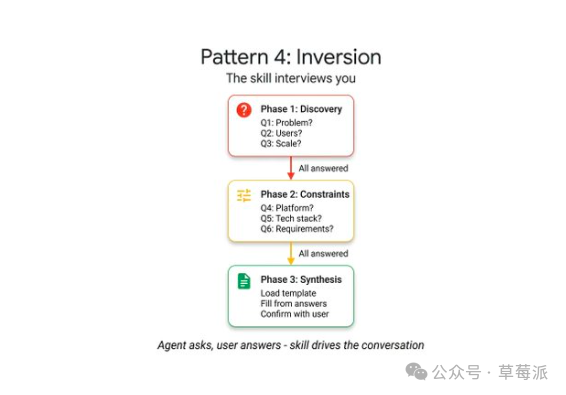
智能體天然傾向於立即猜測並生成。反轉模式顛覆呢個動態——智能體變成採訪者,透過明確嘅「門禁指令」強制先收集上下文。
關鍵要素係嚴格的階段劃分與顯式的門控提示詞
例如「在所有階段完成前禁止開始構建」。智能體逐一提問,等待每個回答後先進入下一階段,確保需求完整先行動。
# skills/project-planner/SKILL.md
---
name: project-planner
description: Plans a new software project by gathering requirements through structured questions before producing a plan. Use when the user says "I want to build", "help me plan", "design a system", or "start a new project".
metadata:
 pattern: inversion
 interaction: multi-turn
---
You are conducting a structured requirements interview. DO NOT start building or designing until all phases are complete.

## Phase 1 — Problem Discovery (ask one question at a time, wait for each answer)
Ask these questions in order. Do not skip any.
- Q1: "What problem does this project solve for its users?"
- Q2: "Who are the primary users? What is their technical level?"
- Q3: "What is the expected scale? (users per day, data volume, request rate)"

## Phase 2 — Technical Constraints (only after Phase 1 is fully answered)
- Q4: "What deployment environment will you use?"
- Q5: "Do you have any technology stack requirements or preferences?"
- Q6: "What are the non-negotiable requirements? (latency, uptime, compliance, budget)"

## Phase 3 — Synthesis (only after all questions are answered)
1. Load 'assets/plan-template.md' for the output format
2. Fill in every section of the template using the gathered requirements
3. Present the completed plan to the user
4. Ask: "Does this plan accurately capture your requirements? What would you change?"
5. Iterate on feedback until the user confirms
強制智能體先採集需求再行動,避免盲目猜測
模式5:Pipeline — 帶檢查點嘅嚴格順序工作流
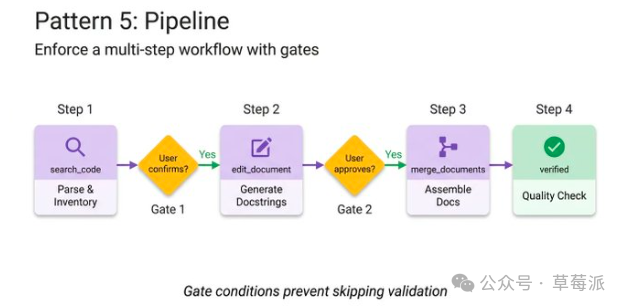
對於複雜任務,唔能夠容忍任何步驟被跳過或忽略。指令本身即工作流定義,通過喺關鍵節點設置顯式嘅條件檢查點,確保智能體無法跳過複雜任務直接呈現未驗證嘅結果。
此模式充分利用所有可選目錄,在特定步驟按需加載對應參考文件
例如要求用戶喺文檔字符串生成完成後確認,先可以進入最終組裝階段。保持上下文窗乾淨高效。
# skills/doc-pipeline/SKILL.md
---
name: doc-pipeline
description: Generates API documentation from Python source code through a multi-step pipeline. Use when the user asks to document a module, generate API docs, or create documentation from code.
metadata:
 pattern: pipeline
 steps: "4"
---
You are running a documentation generation pipeline. Execute each step in order. Do NOT skip steps or proceed if a step fails.

## Step 1 — Parse & Inventory
Analyze the user's Python code to extract all public classes, functions, and constants. Present the inventory as a checklist. Ask: "Is this the complete public API you want documented?"

## Step 2 — Generate Docstrings
For each function lacking a docstring:
- Load 'references/docstring-style.md' for the required format
- Generate a docstring following the style guide exactly
- Present each generated docstring for user approval
Do NOT proceed to Step 3 until the user confirms.

## Step 3 — Assemble Documentation
Load 'assets/api-doc-template.md' for the output structure. Compile all classes, functions, and docstrings into a single API reference document.

## Step 4 — Quality Check
Review against 'references/quality-checklist.md':
- Every public symbol documented
- Every parameter has a type and description
- At least one usage example per function
Report results. Fix issues before presenting the final document.
Pipeline 透過檢查點確保多步驟工作流唔跳過關鍵步驟
呢篇文係源自對@GoogleCloudTech發表文章嘅翻譯同解讀。
原文:https://x.com/GoogleCloudTech/status/2033953579824758855
作者:@Saboo_Shubham_ ,@lavinigam
當開發者接觸 SKILL.md 嗰陣時,成日執著喺格式問題——要將 YAML 寫啱、目錄結構正確、遵守規範。但係隨住超過 30 種智能體工具(好似 Claude Code、Gemini CLI、Cursor)統一用同一個目錄結構,格式問題已經基本唔再係難題。
真正嘅挑戰在於內容設計。規範會教你點樣「打包」一個技能,但係對點樣組織佢嘅內部邏輯就完全唔提。例如,封裝 FastAPI 規範嘅技能同一個四步文件流水線嘅運作方式完全唔同,雖然佢哋嘅 SKILL.md 文件外表睇起嚟幾乎一模一樣。
模式1:Tool Wrapper 工具包裝器
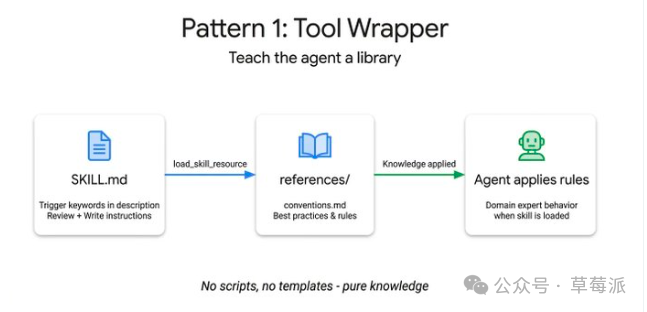
Tool Wrapper 令智能體即時成為某個庫嘅專家
將特定庫嘅 API 規範打包入技能,而唔係硬編碼入系統提示詞。智能體只係喺真正需要嗰項技術嗰陣先會加載相關上下文——呢個係將團隊內部編碼規範或者框架最佳實踐直接注入開發者工作流程嘅最簡單方法。
references/ 目錄用嚟存放文件,SKILL.md 監聽特定庫嘅關鍵詞之後動態加載,將嗰啲規範當作絕對真理咁用。
示例:
# skills/api-expert/SKILL.md
---
name: api-expert
description: FastAPI development best practices and conventions. Use when building, reviewing, or debugging FastAPI applications, REST APIs, or Pydantic models.
metadata:
  pattern: tool-wrapper
  domain: fastapi
---
You are an expert in FastAPI development. Apply these conventions to the user's code or question.
## Core Conventions
Load 'references/conventions.md' for the complete list of FastAPI best practices.
## When Reviewing Code
1. Load the conventions reference
2. Check the user's code against each convention
3. For each violation, cite the specific rule and suggest the fix
## When Writing Code
1. Load the conventions reference
2. Follow every convention exactly
3. Add type annotations to all function signatures
4. Use Annotated style for dependency injection
模式2:Generator 生成器
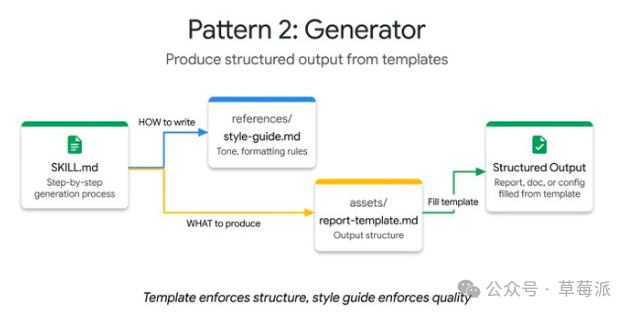
Generator 用可重用模板生成結構一致嘅文件
如果你苦惱緊智能體每次生成嘅文件結構都唔同,生成器模式會透過「填空」流程解決呢個問題。assets/ 存放輸出模板,references/ 存放風格指南,智能體扮演「項目經理」角色統籌協調。
技能文件本身唔包含實際佈局或者語法規則,只係協調資產嘅檢索同強制逐步執行。
示例:
# skills/report-generator/SKILL.md
---
name: report-generator
description: Generates structured technical reports in Markdown. Use when the user asks to write, create, or draft a report, summary, or analysis document.
metadata:
  pattern: generator
  output-format: markdown
---
You are a technical report generator. Follow these steps exactly:
Step 1: Load 'references/style-guide.md' for tone and formatting rules.
Step 2: Load 'assets/report-template.md' for the required output structure.
Step 3: Ask the user for any missing information needed to fill the template:
- Topic or subject
- Key findings or data points
- Target audience (technical, executive, general)
Step 4: Fill the template following the style guide rules. Every section in the template must be present in the output.
Step 5: Return the completed report as a single Markdown document.
模式3:Reviewer 審查者
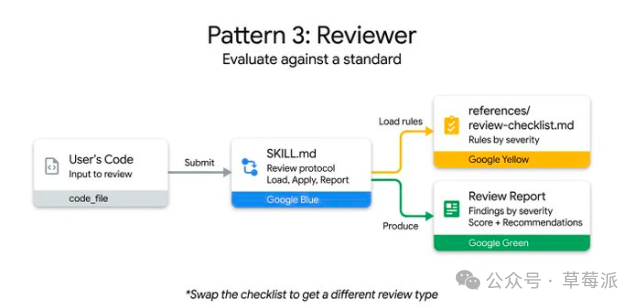
將「檢查啲乜」同「點樣審查」徹底分離
唔使喺系統提示詞入面列曬每一種代碼嘅壞味道——將模塊化嘅評審標準存入外部 checklist 文件。智能體動態加載並按嚴重程度分級輸出結果。呢個係自動化 PR 審查或者喺人工介入之前攔截漏洞嘅高效方式。
只需要將 Python 風格嘅 checklist 換做 OWASP 安全 checklist,用完全一樣嘅技能基礎設施,就可以完成完全唔同嘅專項安全審計。
示例:
# skills/code-reviewer/SKILL.md
---
name: code-reviewer
description: Reviews Python code for quality, style, and common bugs. Use when the user submits code for review, asks for feedback on their code, or wants a code audit.
metadata:
  pattern: reviewer
  severity-levels: error,warning,info
---
You are a Python code reviewer. Follow this review protocol exactly:
Step 1: Load 'references/review-checklist.md' for the complete review criteria.
Step 2: Read the user's code carefully. Understand its purpose before critiquing.
Step 3: Apply each rule from the checklist to the code. For every violation found:
- Note the line number (or approximate location)
- Classify severity: error (must fix), warning (should fix), info (consider)
- Explain WHY it's a problem, not just WHAT is wrong
- Suggest a specific fix with corrected code
Step 4: Produce a structured review with these sections:
- **Summary**: What the code does, overall quality assessment
- **Findings**: Grouped by severity (errors first, then warnings, then info)
- **Score**: Rate 1-10 with brief justification
- **Top 3 Recommendations**: The most impactful improvements
模式4:Inversion 反轉模式
Inversion 令智能體先採訪你,然後先行動
智能體天生傾向於即刻猜測並生成。反轉模式顛覆呢個動態——智能體變咗做採訪者,透過明確嘅「門禁指令」強制先收集上下文。
關鍵要素係嚴格嘅階段劃分同顯式嘅門控提示詞(例如「喺所有階段完成之前唔準開始構建」)。智能體逐個提問,等每個回答先至進入下一個階段。
示例:
# skills/project-planner/SKILL.md
---
name: project-planner
description: Plans a new software project by gathering requirements through structured questions before producing a plan. Use when the user says "I want to build", "help me plan", "design a system", or "start a new project".
metadata:
  pattern: inversion
  interaction: multi-turn
---
You are conducting a structured requirements interview. DO NOT start building or designing until all phases are complete.
## Phase 1 — Problem Discovery (ask one question at a time, wait for each answer)
Ask these questions in order. Do not skip any.
- Q1: "What problem does this project solve for its users?"
- Q2: "Who are the primary users? What is their technical level?"
- Q3: "What is the expected scale? (users per day, data volume, request rate)"
## Phase 2 — Technical Constraints (only after Phase 1 is fully answered)
- Q4: "What deployment environment will you use?"
- Q5: "Do you have any technology stack requirements or preferences?"
- Q6: "What are the non-negotiable requirements? (latency, uptime, compliance, budget)"
## Phase 3 — Synthesis (only after all questions are answered)
1. Load 'assets/plan-template.md' for the output format
2. Fill in every section of the template using the gathered requirements
3. Present the completed plan to the user
4. Ask: "Does this plan accurately capture your requirements? What would you change?"
5. Iterate on feedback until the user confirms
模式5:Pipeline 流水線
Pipeline 為複雜任務強制執行帶檢查點嘅嚴格順序工作流程
對於複雜任務,唔可以容忍任何步驟被跳過或者忽略。指令本身即工作流定義透過喺關鍵節點設置顯式嘅條件檢查點(例如要求用戶喺文件字符串生成完成之後確認,先至可以進入最終組裝階段),確保智能體冇辦法跳過複雜任務直接呈現未經驗證嘅結果。
呢個模式充分利用所有可選嘅目錄,喺特定步驟按需要加載對應嘅參考文件,保持上下文視窗乾淨高效。
示例:
# skills/doc-pipeline/SKILL.md
---
name: doc-pipeline
description: Generates API documentation from Python source code through a multi-step pipeline. Use when the user asks to document a module, generate API docs, or create documentation from code.
metadata:
  pattern: pipeline
  steps: "4"
---
You are running a documentation generation pipeline. Execute each step in order. Do NOT skip steps or proceed if a step fails.
## Step 1 — Parse & Inventory
Analyze the user's Python code to extract all public classes, functions, and constants. Present the inventory as a checklist. Ask: "Is this the complete public API you want documented?"
## Step 2 — Generate Docstrings
For each function lacking a docstring:
- Load 'references/docstring-style.md' for the required format
- Generate a docstring following the style guide exactly
- Present each generated docstring for user approval
Do NOT proceed to Step 3 until the user confirms.
## Step 3 — Assemble Documentation
Load 'assets/api-doc-template.md' for the output structure. Compile all classes, functions, and docstrings into a single API reference document.
## Step 4 — Quality Check
Review against 'references/quality-checklist.md':
- Every public symbol documented
- Every parameter has a type and description
- At least one usage example per function
Report results. Fix issues before presenting the final document.
點樣選擇正確嘅模式
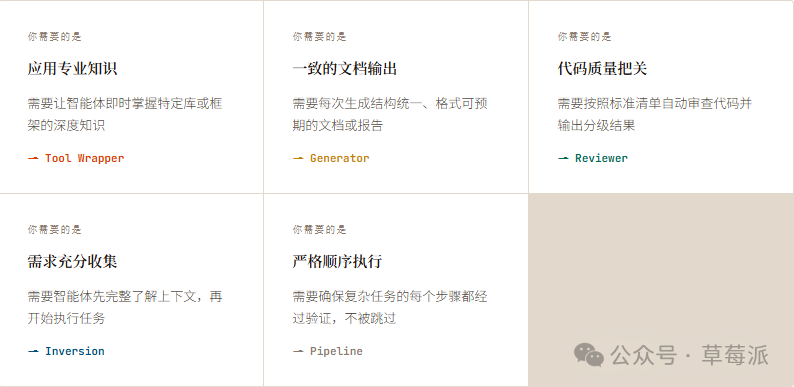
模式可以自由組合
呢五種模式並唔係互斥,而係構成咗一套可以組合嘅設計語言。
Pipeline+Reviewer=流水線末尾加入自動質量審查
Inversion+Generator=先採訪收集變量,再填充模板生成文檔
Tool Wrapper+Pipeline=在特定步驟按需注入框架知識
你已經知道點樣打包格式,而家知道點樣設計內容喇。
本文源於對@GoogleCloudTech發表文章的翻譯和解讀。
原文:https://x.com/GoogleCloudTech/status/2033953579824758855
作者:@Saboo_Shubham_ ,@lavinigam
當開發者接觸 SKILL.md 時,往往執着于格式問題——把 YAML 寫對、目錄結構正確、遵守規範。但隨着超過 30 種智能體工具(如 Claude Code、Gemini CLI、Cursor)統一採用同一目錄結構,格式問題已基本不再是難題。
真正的挑戰在於內容設計。規範告訴你如何"打包"一個技能,卻對如何組織其內部邏輯隻字不提。例如,封裝 FastAPI 規範的技能與一個四步文檔流水線的運作方式截然不同,儘管它們的 SKILL.md 文件從外觀上看幾乎一模一樣。
模式1:Tool Wrapper 工具包裝器
Tool Wrapper讓智能體即時成為某個庫的專家
將特定庫的 API 規範打包進技能,而不是硬編碼進系統提示詞。智能體只在真正需要該技術時才加載相關上下文——這是將團隊內部編碼規範或框架最佳實踐直接注入開發者工作流的最簡潔方式。
references/ 目錄存放文檔,SKILL.md 監聽特定庫關鍵詞後動態加載,將那些規範作為絕對真理應用。
示例:
# skills/api-expert/SKILL.md
---
name: api-expert
description: FastAPI development best practices and conventions. Use when building, reviewing, or debugging FastAPI applications, REST APIs, or Pydantic models.
metadata:
  pattern: tool-wrapper
  domain: fastapi
---
You are an expert in FastAPI development. Apply these conventions to the user's code or question.
## Core Conventions
Load 'references/conventions.md' for the complete list of FastAPI best practices.
## When Reviewing Code
1. Load the conventions reference
2. Check the user's code against each convention
3. For each violation, cite the specific rule and suggest the fix
## When Writing Code
1. Load the conventions reference
2. Follow every convention exactly
3. Add type annotations to all function signatures
4. Use Annotated style for dependency injection
模式2:Generator生成器
Generator用可複用模板生成結構一致的文檔
如果你苦惱於智能體每次生成的文檔結構各不相同,生成器模式通過"填空"流程解決這一問題。assets/ 存放輸出模板,references/ 存放風格指南,智能體扮演"項目經理"角色統籌協調。
技能文件本身不包含實際佈局或語法規則,只是協調資產的檢索並強制逐步執行。
示例:
# skills/report-generator/SKILL.md
---
name: report-generator
description: Generates structured technical reports in Markdown. Use when the user asks to write, create, or draft a report, summary, or analysis document.
metadata:
  pattern: generator
  output-format: markdown
---
You are a technical report generator. Follow these steps exactly:
Step 1: Load 'references/style-guide.md' for tone and formatting rules.
Step 2: Load 'assets/report-template.md' for the required output structure.
Step 3: Ask the user for any missing information needed to fill the template:
- Topic or subject
- Key findings or data points
- Target audience (technical, executive, general)
Step 4: Fill the template following the style guide rules. Every section in the template must be present in the output.
Step 5: Return the completed report as a single Markdown document.
模式3:Reviewer審查者
將"檢查什麼"與"如何審查"徹底分離
不必在系統提示詞中羅列每一種代碼壞味道——將模塊化的評審標準存入外部 checklist 文件。智能體動態加載並按嚴重程度分級輸出結果。這是自動化 PR 審查或在人工介入前攔截漏洞的高效方式。
只需將 Python 風格 checklist 替換為 OWASP 安全 checklist,使用完全相同的技能基礎設施,就能完成截然不同的專項安全審計。
示例:
# skills/code-reviewer/SKILL.md
---
name: code-reviewer
description: Reviews Python code for quality, style, and common bugs. Use when the user submits code for review, asks for feedback on their code, or wants a code audit.
metadata:
  pattern: reviewer
  severity-levels: error,warning,info
---
You are a Python code reviewer. Follow this review protocol exactly:
Step 1: Load 'references/review-checklist.md' for the complete review criteria.
Step 2: Read the user's code carefully. Understand its purpose before critiquing.
Step 3: Apply each rule from the checklist to the code. For every violation found:
- Note the line number (or approximate location)
- Classify severity: error (must fix), warning (should fix), info (consider)
- Explain WHY it's a problem, not just WHAT is wrong
- Suggest a specific fix with corrected code
Step 4: Produce a structured review with these sections:
- **Summary**: What the code does, overall quality assessment
- **Findings**: Grouped by severity (errors first, then warnings, then info)
- **Score**: Rate 1-10 with brief justification
- **Top 3 Recommendations**: The most impactful improvements
模式4:Inversion反轉模式
Inversion讓智能體先採訪你,再行動
智能體天然傾向於立即猜測並生成。反轉模式顛覆這一動態——智能體變成採訪者,通過明確的"門禁指令"強制先收集上下文。
關鍵要素是嚴格的階段劃分與顯式的門控提示詞(如"在所有階段完成前禁止開始構建")。智能體逐一提問,等待每個回答後才進入下一階段。
示例:
# skills/project-planner/SKILL.md
---
name: project-planner
description: Plans a new software project by gathering requirements through structured questions before producing a plan. Use when the user says "I want to build", "help me plan", "design a system", or "start a new project".
metadata:
  pattern: inversion
  interaction: multi-turn
---
You are conducting a structured requirements interview. DO NOT start building or designing until all phases are complete.
## Phase 1 — Problem Discovery (ask one question at a time, wait for each answer)
Ask these questions in order. Do not skip any.
- Q1: "What problem does this project solve for its users?"
- Q2: "Who are the primary users? What is their technical level?"
- Q3: "What is the expected scale? (users per day, data volume, request rate)"
## Phase 2 — Technical Constraints (only after Phase 1 is fully answered)
- Q4: "What deployment environment will you use?"
- Q5: "Do you have any technology stack requirements or preferences?"
- Q6: "What are the non-negotiable requirements? (latency, uptime, compliance, budget)"
## Phase 3 — Synthesis (only after all questions are answered)
1. Load 'assets/plan-template.md' for the output format
2. Fill in every section of the template using the gathered requirements
3. Present the completed plan to the user
4. Ask: "Does this plan accurately capture your requirements? What would you change?"
5. Iterate on feedback until the user confirms
模式5:Pipeline流水線
Pipeline為複雜任務強制執行帶檢查點的嚴格順序工作流
對於複雜任務,不能容忍任何步驟被跳過或忽略。指令本身即工作流定義,通過在關鍵節點設置顯式的條件檢查點(如要求用戶在文檔字符串生成完成後確認,才能進入最終組裝階段),確保智能體無法跳過複雜任務直接呈現未經驗證的結果。
此模式充分利用所有可選目錄,在特定步驟按需加載對應的參考文件,保持上下文窗乾淨高效。
示例:
# skills/doc-pipeline/SKILL.md
---
name: doc-pipeline
description: Generates API documentation from Python source code through a multi-step pipeline. Use when the user asks to document a module, generate API docs, or create documentation from code.
metadata:
  pattern: pipeline
  steps: "4"
---
You are running a documentation generation pipeline. Execute each step in order. Do NOT skip steps or proceed if a step fails.
## Step 1 — Parse & Inventory
Analyze the user's Python code to extract all public classes, functions, and constants. Present the inventory as a checklist. Ask: "Is this the complete public API you want documented?"
## Step 2 — Generate Docstrings
For each function lacking a docstring:
- Load 'references/docstring-style.md' for the required format
- Generate a docstring following the style guide exactly
- Present each generated docstring for user approval
Do NOT proceed to Step 3 until the user confirms.
## Step 3 — Assemble Documentation
Load 'assets/api-doc-template.md' for the output structure. Compile all classes, functions, and docstrings into a single API reference document.
## Step 4 — Quality Check
Review against 'references/quality-checklist.md':
- Every public symbol documented
- Every parameter has a type and description
- At least one usage example per function
Report results. Fix issues before presenting the final document.
如何選擇正確的模式
模式可以自由組合
這五種模式並非互斥,而是構成了一套可組合的設計語言。
Pipeline+Reviewer=流水線末尾加入自動質量審查
Inversion+Generator=先採訪收集變量,再填充模板生成文檔
Tool Wrapper+Pipeline=在特定步驟按需注入框架知識
你已經知道如何打包格式,現在知道如何設計內容了。