如何讓多個 AI 不互相干擾?OpenClaw 多 Agent 終極指南(多bot方式)!!
整理版優先睇
用多個 Telegram Bot 隔離 OpenClaw Agent,避免人格分裂
呢篇文章係大瑜分享嘅 OpenClaw 多 Agent 實戰經驗。佢發現好多人用 OpenClaw 只配一個 Agent,搞到寫文、寫碼、運營全部塞埋一齊,結果初期爽,幾日後就人格分裂。為咗解決呢個問題,之前佢介紹過用一個 Bot 加多個羣組嘅方式,但係需要開好多羣,對個人用戶嚟講太麻煩。
今次佢提出一個新方案:直接開多個 Telegram Bot,每個 Bot 獨立對應一個 Agent,咁樣就做到完全隔離。步驟好簡單,先喺 BotFather 度建立唔同 Bot,然後喺 OpenClaw 嘅 account 度加入呢啲 Bot,再建立對應嘅 Agent,最後修改 openclaw.json 嘅 bindings 同 channels 設定,將每個 Bot 綁定到指定 Agent。
整體結論係:呢個多 Bot 方案比之前嘅多羣方案更簡單直接,尤其適合個人用戶。只需要一個 OpenClaw 實例,就可以同時運行多個獨立 Agent,唔使驚互相干擾。文章最後仲提供咗完整嘅配置範例,方便讀者直接複製修改。
- 單一 Agent 做多種任務會人格分裂,解決方法係每個 Agent 只專注一類工作
- 之前用多羣方案配置麻煩,今次用多 Bot 方案更適合個人用戶
- 步驟簡單:建立多個 Telegram Bot → 加入 OpenClaw account → 建立 Agent → 修改配置綁定
- 配置範例清楚顯示 agent list、bindings 同 channels 嘅對應關係
- 實測顯示同一個 OpenClaw 可以同時處理運營同技術對話,互不幹擾
OpenClaw 多 Agent 配置模板(多 Bot 方式)
包括 agents list、bindings 同 channels 嘅完整 JSON 設定,直接複製修改即可
點解要搞多個 Agent?
大瑜發現好多人用 OpenClaw 只配一個 Agent,寫文、寫碼、運營全部塞曬入同一個 agent 度。結果初期用得好爽,但過幾日就開始人格分裂,因為 agent 嘅知識同指令互相干擾。
上一篇文章介紹咗用一個 Bot 加多個羣組嘅方法,每個羣扮演唔同角色。但係呢個方法需要開好多羣,對個人用戶嚟講配置比較麻煩。
多 Bot 方案:簡單直接嘅隔離方式
今次大瑜提出一個新方案:直接喺 Telegram 度開多個 Bot,每個 Bot 獨立對應一個 Agent。咁樣唔使開羣,只要同唔同 Bot 對話就得,隔離效果一樣好。
- 1 第一步:去 Telegram BotFather 建立多個 Bot,例如 zongti、tech、writer,記低每個 Bot Token
- 2 第二步:將呢啲 Bot 加入 OpenClaw 嘅 account 設定,喺 openclaw.json 嘅 channels.telegram.accounts 度加返
- 3 第三步:用指令 openclaw agents add <id> 建立對應嘅 Agent,例如 openclaw agents add zongti
- 4 第四步:修改 openclaw.json 嘅 bindings 部分,將每個 Agent 綁定到相應嘅 Telegram account
- 5 最後一步:重啟 OpenClaw Gateway 令設定生效
重點係每個 Bot 要有獨立嘅 token,每個 Agent 要有獨立嘅 workspace 同 agentDir,咁樣先做到完全隔離
配置範例:直接參考改就得
以下係完整嘅 openclaw.json 配置,包含咗三個 Agent(zongti、tech、writer)同三個 Bot。你可以直接複製,然後改成自己嘅 Bot Token 同路徑。
{
 "agents": {
 "defaults": {
 "model": { "primary": "openai-codex/gpt-5.2" },
 "models": { "openai-codex/gpt-5.2": {} },
 "workspace": "C:\\Users\\Administrator\\.openclaw\\workspace",
 "compaction": { "mode": "safeguard" },
 "maxConcurrent": 4,
 "subagents": { "maxConcurrent": 8 }
 },
 "list": [
 {
 "id": "zongti",
 "default": true,
 "workspace": "C:\\Users\\Administrator\\.openclaw\\workspace-zongti",
 "agentDir": "C:\\Users\\Administrator\\.openclaw\\agents\\zongti\\agent",
 "model": { "primary": "openai-codex/gpt-5.2" }
 },
 {
 "id": "tech",
 "workspace": "C:\\Users\\Administrator\\.openclaw\\workspace-tech",
 "agentDir": "C:\\Users\\Administrator\\.openclaw\\agents\\tech\\agent",
 "model": { "primary": "openai-codex/gpt-5.2" }
 },
 {
 "id": "writer",
 "workspace": "C:\\Users\\Administrator\\.openclaw\\workspace-writer",
 "agentDir": "C:\\Users\\Administrator\\.openclaw\\agents\\writer\\agent",
 "model": { "primary": "openai-codex/gpt-5.2" }
 }
 ]
 },
 "bindings": [
 { "agentId": "zongti", "match": { "channel": "telegram", "accountId": "zongti" } },
 { "agentId": "tech", "match": { "channel": "telegram", "accountId": "tech" } },
 { "agentId": "writer", "match": { "channel": "telegram", "accountId": "writer" } }
 ],
 "messages": { "ackReactionScope": "group-mentions" },
 "commands": { "native": "auto", "nativeSkills": "auto" },
 "channels": {
 "telegram": {
 "enabled": true,
 "dmPolicy": "pairing",
 "groupPolicy": "allowlist",
 "streamMode": "partial",
 "accounts": {
 "zongti": { "enabled": true, "dmPolicy": "pairing", "botToken": "XXXX1", "groupPolicy": "allowlist", "streamMode": "partial" },
 "tech": { "enabled": true, "dmPolicy": "pairing", "botToken": "XXXX2", "groupPolicy": "allowlist", "streamMode": "partial" },
 "writer": { "enabled": true, "dmPolicy": "pairing", "botToken": "XXXX3", "groupPolicy": "allowlist", "streamMode": "partial" }
 }
 }
 },
 "plugins": {
 "entries": { "telegram": { "enabled": true } }
 }
}實測效果:運營同技術各自為政
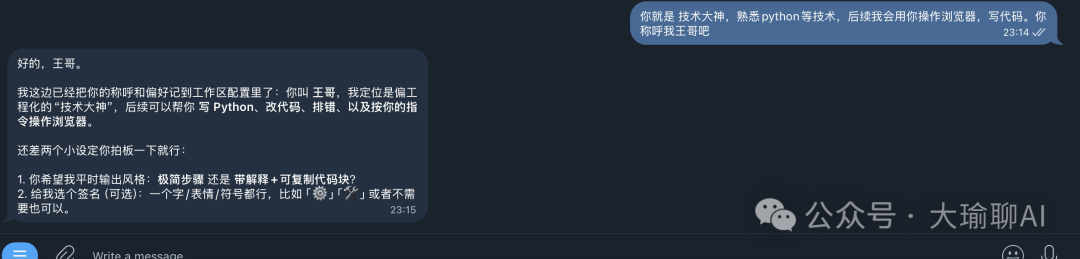
大瑜示範咗測試結果:同一個 OpenClaw 實例,分別同運營 Bot 同技術 Bot 對話。你可以見到兩個 Agent 嘅回覆風格完全唔同,完全冇互相干擾。
呢個方案特別適合個人用戶,唔使開羣組,直接同唔同 Bot 傾偈就得
如果你都想玩 OpenClaw 嘅多 Agent 玩法,可以考慮參加大瑜嘅實戰營,10 日課程只係 49.9 蚊,微信 helloaigc2023 查詢。
大瑜最近開咗個10日嘅openclaw訓練營,有興趣就拉到最底睇說明,或者加微信 helloaigc2023,瞭解。
好多人用 OpenClaw 淨係 set 一個 agent:寫文、寫 code、做運營全部塞曬入去!
結果:頭三日好爽,第七日人格分裂。
所以解決方法就係:set 多個 agent,每個 agent 淨係做一類嘢!
上篇文章我哋講過用一個 bot,開幾個 group 嘅方式嚟 set 多個 agent,等 agent 喺唔同 group 扮演唔同角色!
所謂:入到邊個 group 就唱邊首歌!
可以睇呢篇文章:
3 個 AI 同時 online 但係互不幹擾?OpenClaw 多 Agent 架構完全指南!
但係遇到問題:
1、雖然只需要一個 bot,但係要開 group,set 起上嚟比較麻煩
2、如果只係個人用家,就唔需要咁多 group。
咁今日就有新方案啦:
用 Telegram 整多個 bot,每個 bot 獨立 set,咁就可以做到互相隔離。
一、具體步驟
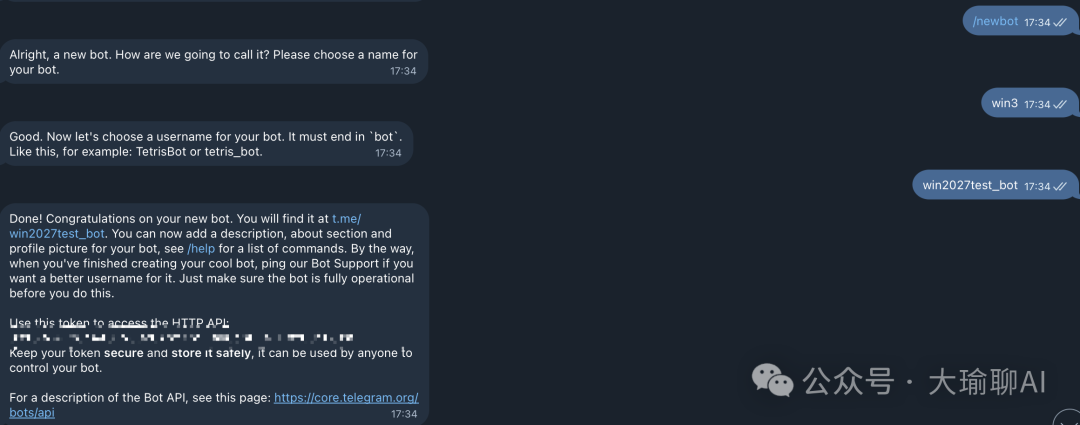
第一步:開多個 bot,揾到 Telegram 嘅 BotFather,做下面嘅操作。分別整 zongti、tech、writer 三個 bot。
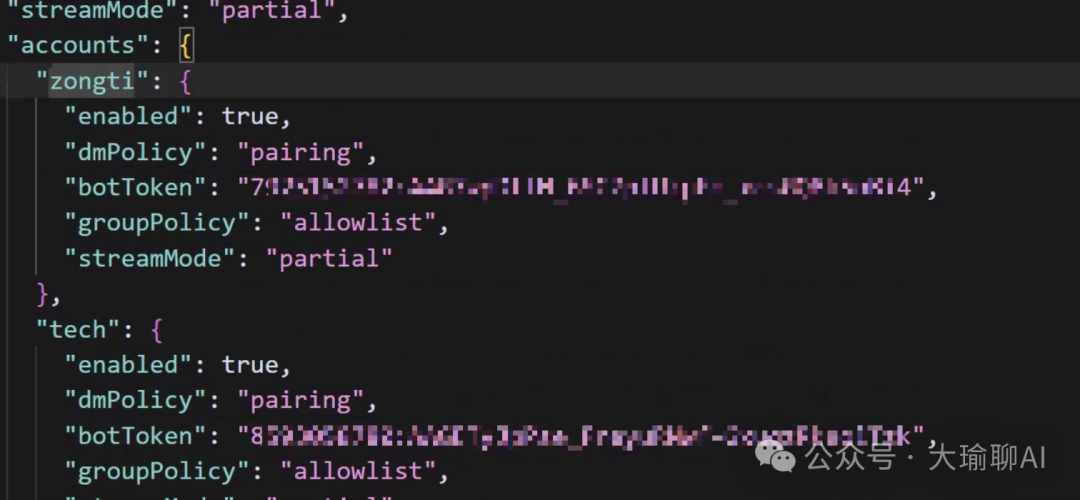
第二步:將 agent 加落 account 帳户入面,改 openclaw.json
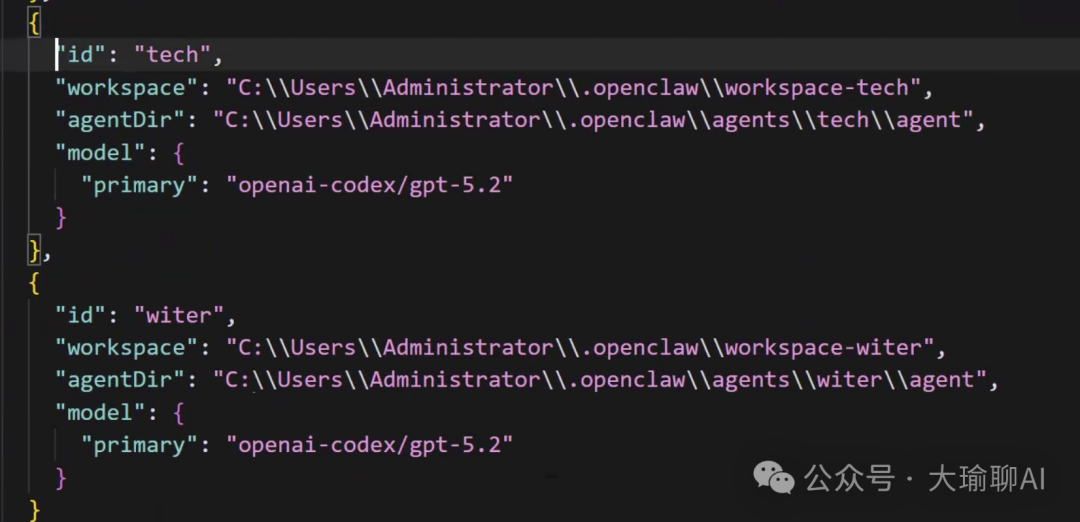
第三步:做下面嘅操作,建立 agent 列表。
openclaw agents add zongti
openclaw agents add tech
openclaw agents add writer
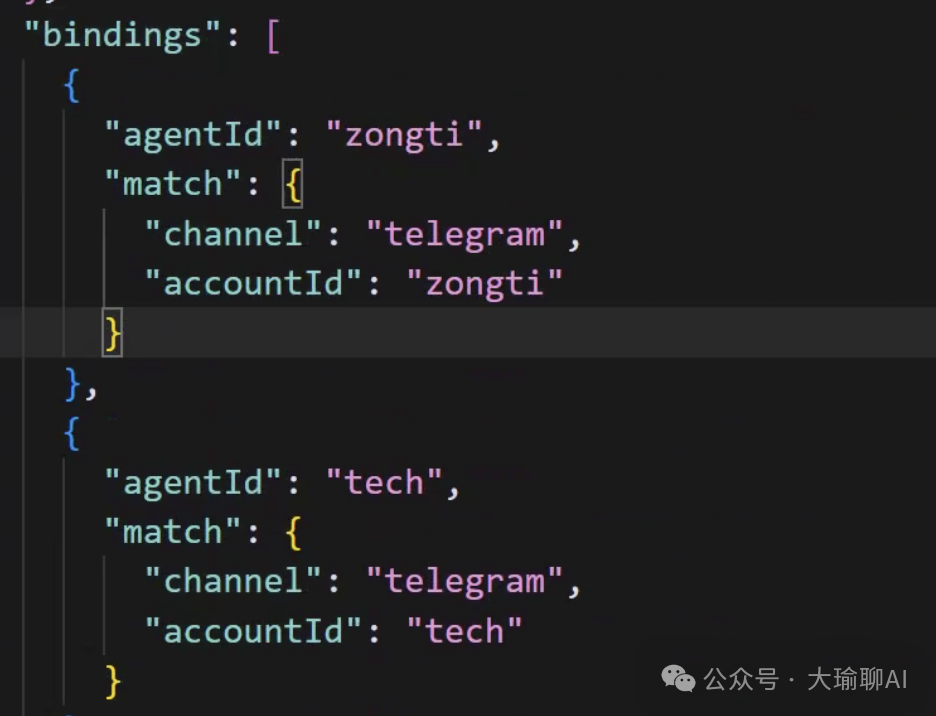
第四步:改 build 嘅內容,將 agent 同帳户綁定。
最後一步,重啟 gateway。記得 backup openclaw.json。
最後要改嘅地方如下,大家可以參考:
{
  "agents": {
    "defaults": {
      "model": { "primary": "openai-codex/gpt-5.2" },
      "models": { "openai-codex/gpt-5.2": {} },
      "workspace": "C:\\Users\\Administrator\\.openclaw\\workspace",
      "compaction": { "mode": "safeguard" },
      "maxConcurrent": 4,
      "subagents": { "maxConcurrent": 8 }
    },
    "list": [
      {
        "id": "zongti",
        "default": true,
        "workspace": "C:\\Users\\Administrator\\.openclaw\\workspace-zongti",
        "agentDir": "C:\\Users\\Administrator\\.openclaw\\agents\\zongti\\agent",
        "model": { "primary": "openai-codex/gpt-5.2" }
      },
      {
        "id": "tech",
        "workspace": "C:\\Users\\Administrator\\.openclaw\\workspace-tech",
        "agentDir": "C:\\Users\\Administrator\\.openclaw\\agents\\tech\\agent",
        "model": { "primary": "openai-codex/gpt-5.2" }
      },
      {
        "id": "writer",
        "workspace": "C:\\Users\\Administrator\\.openclaw\\workspace-writer",
        "agentDir": "C:\\Users\\Administrator\\.openclaw\\agents\\writer\\agent",
        "model": { "primary": "openai-codex/gpt-5.2" }
      }
    ]
  },

  "bindings": [
    { "agentId": "zongti", "match": { "channel": "telegram", "accountId": "zongti" } },
    { "agentId": "tech",   "match": { "channel": "telegram", "accountId": "tech" } },
    { "agentId": "writer", "match": { "channel": "telegram", "accountId": "writer" } }
  ],

  "messages": { "ackReactionScope": "group-mentions" },
  "commands": { "native": "auto", "nativeSkills": "auto" },

  "channels": {
    "telegram": {
      "enabled": true,
      "dmPolicy": "pairing",
      "groupPolicy": "allowlist",
      "streamMode": "partial",
      "accounts": {
        "zongti": { "enabled": true, "dmPolicy": "pairing", "botToken": "XXXX1", "groupPolicy": "allowlist", "streamMode": "partial" },
        "tech":   { "enabled": true, "dmPolicy": "pairing", "botToken": "XXXX2", "groupPolicy": "allowlist", "streamMode": "partial" },
        "writer": { "enabled": true, "dmPolicy": "pairing", "botToken": "XXXX3", "groupPolicy": "allowlist", "streamMode": "partial" }
      }
    }
  },

  "plugins": {
    "entries": { "telegram": { "enabled": true } }
  }
}
測試結果,睇下喺唔同 group 嘅表現啦。
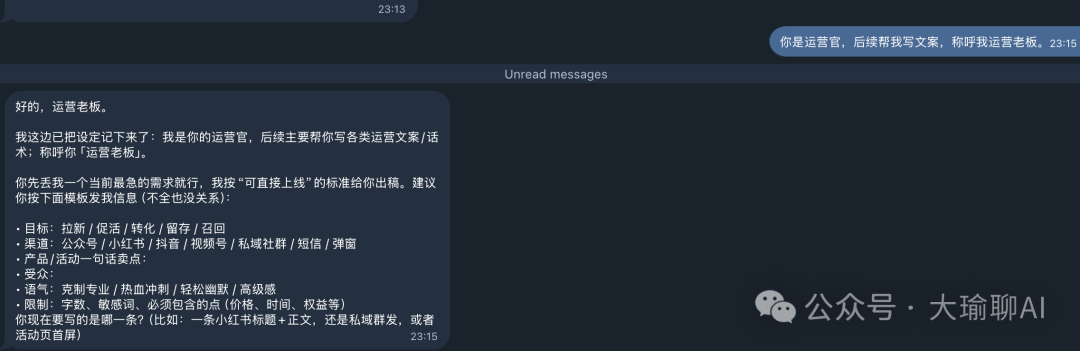
上面係同運營 bot 嘅對話,下面係同技術 bot 嘅對話
二、後面嘅話
如果你都想學 openclaw 同埋好玩嘅玩法,可以諗下參加「大瑜實戰營」。而家價錢係 49.9 蚊。
新年 10 日,帶你認識唔一樣嘅 openclaw。
有興趣嘅話,微信 helloaigc2023,瞭解。
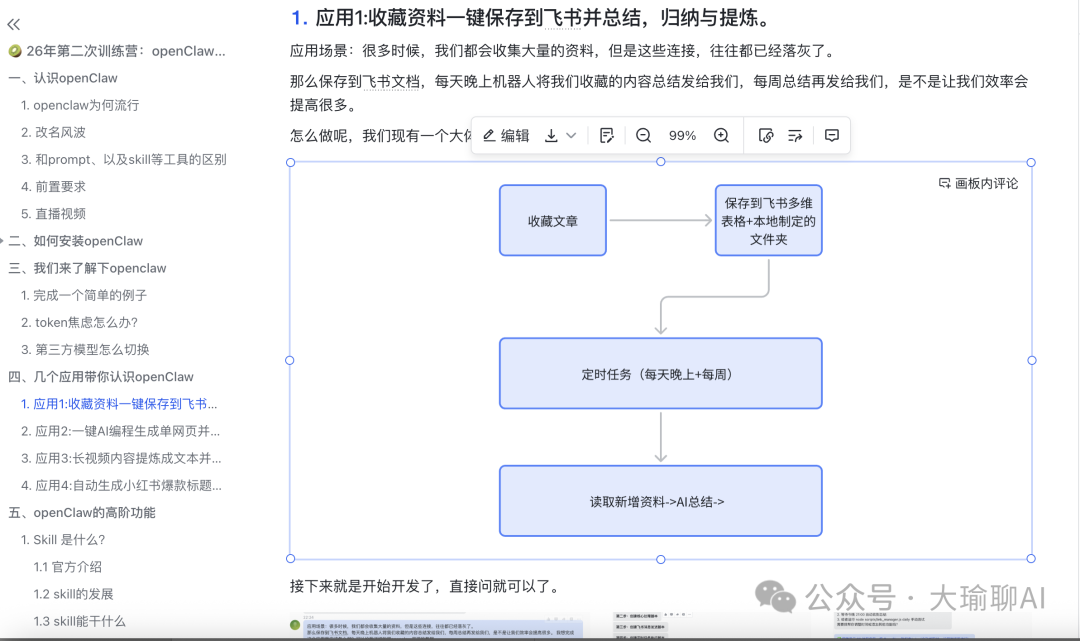
大瑜最近開了10天的openclaw訓練營,感興趣滑到底部看說明,或者加微信 helloaigc2023,瞭解。
很多人用 OpenClaw 只配一個 agent:寫文、寫碼、運營全塞進去!
結果:前三天爽,第七天人格分裂。
那麼解決辦法就是:配置多個agent,每個agent只幹一類事情!
在上一篇文章中,我們寫到用一個bot,建立多個羣的方式來配置多agent,讓agent在多個羣中扮演不同的角色!
所謂:到那個羣唱哪個歌曲!
可以看這篇文章:
3 個 AI 同時在線卻互不干擾?OpenClaw 多 Agent 架構完全指南!
但是遇到問題:
1、雖然只需要一個bot,但是需要建羣,配置比較麻煩
2、如果只是個人用戶的話,不需要那麼多羣。
那麼今天新的方案來了:
通過生成telegram多個bot,每個bot單獨配置,這樣就可以起到互相隔離的作用。
一、具體步驟
第一步:新建多個bot,找到telegram的botfather,執行下面的操作。分別生成zongti,tech,writer三個bot。
第二步:將agent添加進去account賬户中,修改openclaw.json
第三步:執行下面的操作,創建具體的agent列表。
openclaw agents add zongti
openclaw agents add tech
openclaw agents add writer
第四步:修改build的內容,綁定agent和賬户。
最後一步,重啓gateway。記得備份openclaw.json.
最終要修改的地方如下,大家可以參考:
{
  "agents": {
    "defaults": {
      "model": { "primary": "openai-codex/gpt-5.2" },
      "models": { "openai-codex/gpt-5.2": {} },
      "workspace": "C:\\Users\\Administrator\\.openclaw\\workspace",
      "compaction": { "mode": "safeguard" },
      "maxConcurrent": 4,
      "subagents": { "maxConcurrent": 8 }
    },
    "list": [
      {
        "id": "zongti",
        "default": true,
        "workspace": "C:\\Users\\Administrator\\.openclaw\\workspace-zongti",
        "agentDir": "C:\\Users\\Administrator\\.openclaw\\agents\\zongti\\agent",
        "model": { "primary": "openai-codex/gpt-5.2" }
      },
      {
        "id": "tech",
        "workspace": "C:\\Users\\Administrator\\.openclaw\\workspace-tech",
        "agentDir": "C:\\Users\\Administrator\\.openclaw\\agents\\tech\\agent",
        "model": { "primary": "openai-codex/gpt-5.2" }
      },
      {
        "id": "writer",
        "workspace": "C:\\Users\\Administrator\\.openclaw\\workspace-writer",
        "agentDir": "C:\\Users\\Administrator\\.openclaw\\agents\\writer\\agent",
        "model": { "primary": "openai-codex/gpt-5.2" }
      }
    ]
  },

  "bindings": [
    { "agentId": "zongti", "match": { "channel": "telegram", "accountId": "zongti" } },
    { "agentId": "tech",   "match": { "channel": "telegram", "accountId": "tech" } },
    { "agentId": "writer", "match": { "channel": "telegram", "accountId": "writer" } }
  ],

  "messages": { "ackReactionScope": "group-mentions" },
  "commands": { "native": "auto", "nativeSkills": "auto" },

  "channels": {
    "telegram": {
      "enabled": true,
      "dmPolicy": "pairing",
      "groupPolicy": "allowlist",
      "streamMode": "partial",
      "accounts": {
        "zongti": { "enabled": true, "dmPolicy": "pairing", "botToken": "XXXX1", "groupPolicy": "allowlist", "streamMode": "partial" },
        "tech":   { "enabled": true, "dmPolicy": "pairing", "botToken": "XXXX2", "groupPolicy": "allowlist", "streamMode": "partial" },
        "writer": { "enabled": true, "dmPolicy": "pairing", "botToken": "XXXX3", "groupPolicy": "allowlist", "streamMode": "partial" }
      }
    }
  },

  "plugins": {
    "entries": { "telegram": { "enabled": true } }
  }
}
測試結果,看看在不同組的表現吧。
上面是和運營bot的對話,下面是和技術bot的對話
二、寫在後面的話
如果你也想學習openclaw以及好玩的用法,可以考慮參加大瑜實戰營。目前價格49.9元。
過年10天,帶你認識不一樣的openclaw。
感興趣的話,微信helloaigc2023,瞭解。